

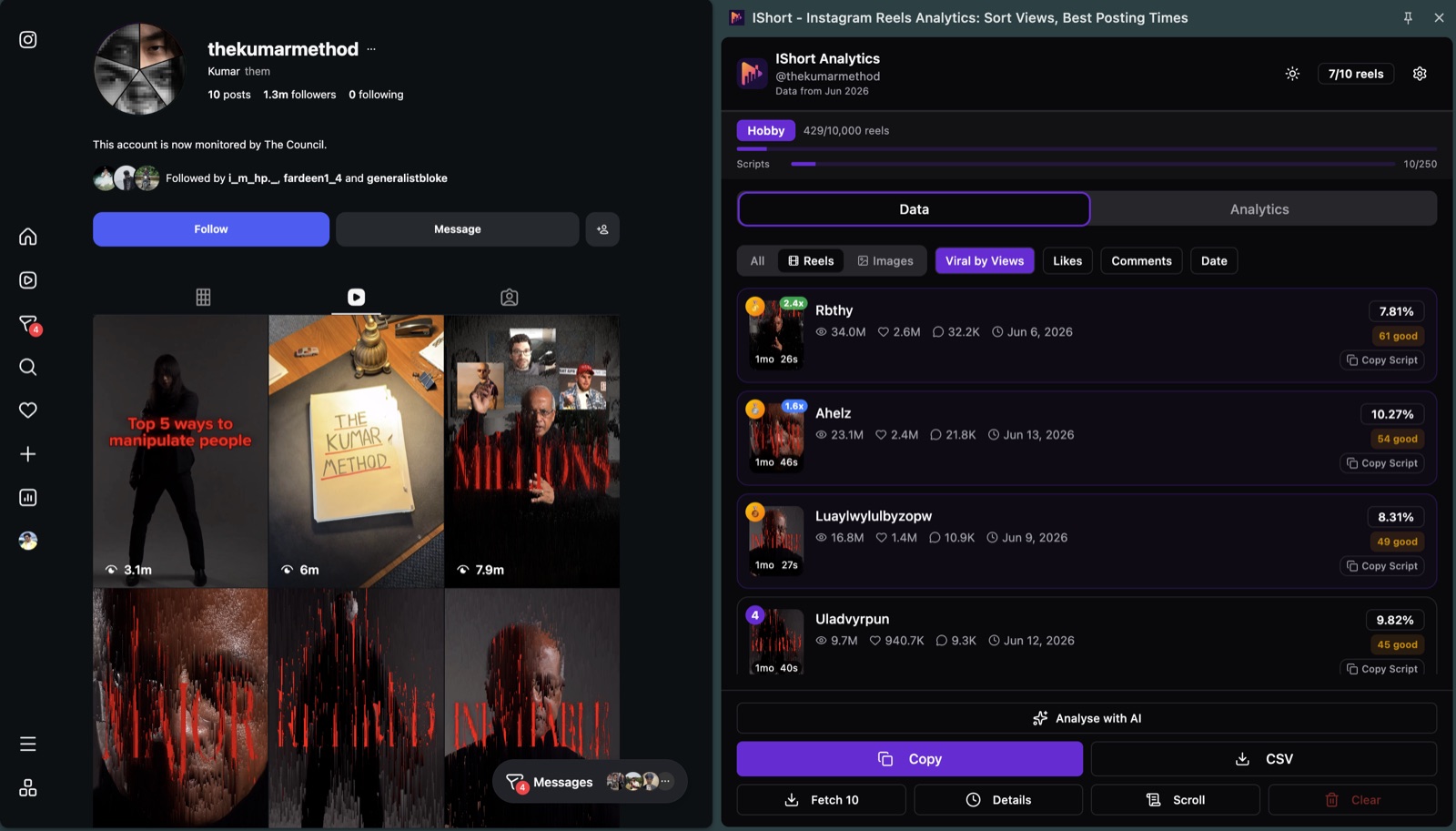
Quick answer: An outlier score is a Reel's views divided by the account's typical views. 1x is normal, 2x or more is a breakout, under 0.5x is a flop. To see it without a spreadsheet, install the free IShort extension and open any public account's Reels: every Reel that scores 1.5x or more (or under 0.5x) gets a coloured badge such as 2.4x, measured against the average of the Reels you've loaded. Instagram itself never shows this number.
What Is an Instagram Reels Outlier Score?
An Instagram Reels outlier score is a multiplier that compares a single Reel's view count to the median view count of an account's recent Reels. It answers one specific question: how much did this Reel beat my typical performance? A score of 1x means the Reel landed exactly on your median. A score of 5x means the Reel got five times the median — an objectively breakout result, no matter your follower count.
The metric exists because raw view counts are useless without context. On most accounts the gap between the best Reel and a typical one is large, often ten times or more — meaning your "average" Reel and your viral Reel can live in completely different distribution worlds. Outlier score makes that gap measurable.
Here is the simple version. If your last 30 Reels typically pulled around 4,000 views and one of them suddenly hit 28,000, that Reel has an outlier score of 7x. The algorithm decided, for some specific reason, to push it harder than your normal content. Studying that one Reel — its hook, its audio, its caption, its length, its timing — is how creators reverse-engineer what is actually working right now.
Why Instagram Doesn't Show an Outlier Score
Instagram shows each Reel's view count, and Insights (for your own Business or Creator account) lets you order your content by views for a period. It never shows your typical views, so it can't tell you whether 10,000 views is great or poor for you, and it shows nothing like this for anyone else's account. An outlier score needs a baseline, which means collecting many Reels and doing the maths yourself, or using a tool that does it.
The Math: outlier_score = views ÷ median_views
The formula is deliberately simple:
outlier_score = Reel views ÷ median views of your last 30 Reels
Most analytics tools use the last 30 Reels as the baseline window because it captures roughly one to two months of content for active creators — recent enough to reflect your current audience and reach, but large enough to smooth out random variance. Some tools use the trailing 90 days instead. Both approaches are defensible; the key is to be consistent.
Worked example. Suppose your last 30 Reels generated the following view counts (sorted from lowest to highest, abbreviated): 1,200, 1,800, 2,400, 3,100, 3,800, 4,200, 4,600, 5,000, 5,400, 6,000... up to 15,000 on the top end. The median (middle value) is 4,800 views. Now you post a new Reel and it hits 24,000 views. Your outlier score for that Reel is 24,000 ÷ 4,800 = 5x. That is a notable breakout.
Why median instead of mean? Because the mean is itself distorted by outliers. If you had one previous 50,000-view Reel sitting in your dataset, it would yank your mean upward and make every subsequent Reel look weaker than it really is. The median is robust against that — it shrugs off extreme values on either end. Later's analytics guidance recommends median-based comparisons for exactly this reason when benchmarking creator content.
Why Outlier Score Beats Raw Views (a 3-Way Comparison)
Consider three accounts, each of which just posted a Reel that hit 10,000 views. Looking at raw numbers alone, you would assume all three Reels performed identically. They did not.
| Account | Median views | This Reel | Outlier score | Verdict |
|---|---|---|---|---|
| Small creator (1K followers) | 500 | 10,000 | 20x | Massive breakout. Study and replicate immediately. |
| Mid creator (10K followers) | 4,000 | 10,000 | 2.5x | Above average. Worth a quick teardown. |
| Established creator (100K followers) | 40,000 | 10,000 | 0.25x | Significant underperformer. Reels got suppressed somehow. |
The 10,000-view number means three radically different things in those three contexts. Raw views told you nothing. Outlier score told you everything. This is also why platform-wide "viral threshold" benchmarks like "1 million views is viral" are largely useless — they ignore the creator's baseline entirely. Sprout Social's analytics framework reaches the same conclusion: relative performance metrics outperform absolute thresholds for assessing content quality at any account size.
Outlier Score Benchmarks: What Counts as Viral
These bands are IShort's editorial guide, not a published study. In practice most Reels on an account land between 0.5x and 1.5x — the messy middle of "average for you" — which is why IShort only badges Reels outside that band. True outliers are rare and meaningful.
| Outlier score | Classification | What it tells you |
|---|---|---|
| < 0.5x | Underperformer | Reel got less than half your median. Often a saturation, audio mismatch, or quality issue. |
| 0.5x – 1.5x | Baseline | The bulk of your Reels live here. Normal variance, no signal. |
| 1.5x – 2x | Above average | Worth flagging. Something nudged distribution upward. |
| 2x – 5x | Strong hit | The algorithm is actively pushing this Reel beyond your follower base. Replicate within 7 days. |
| 5x – 10x | Notable outlier | True breakout. Treat the format, hook, and audio as a template for follow-up Reels. |
| > 10x | Breakout viral | Rare event. Ride the momentum hard. |
Hopper HQ's benchmark research on Instagram engagement reaches a similar conclusion: the gap between baseline and viral content widens dramatically with engagement signal strength, which is why outlier multipliers, not raw view counts, are the right unit of measurement.
How to Calculate Outlier Score Manually (Step by Step)
You can compute outlier score in a spreadsheet in about five minutes using Instagram Insights as your data source. Here is the workflow.
- Open Instagram Insights for your last 30 Reels. On mobile, go to your profile, tap the menu icon, then "Insights." Switch to the "Content You Shared" section and filter by Reels. Set the time range to capture roughly 30 Reels — for most creators, that is the last 60 to 90 days.
- Record the view count for each Reel. Tap into each Reel one at a time and note the view count. Drop these into a spreadsheet column. This is the tedious part, which is why most creators use an extension that exports the data automatically.
- Calculate the median. In Google Sheets or Excel, use the formula
=MEDIAN(A1:A30)on your view-count column. This is your baseline. Write it down. - Compute each Reel's outlier score. For each row, divide that Reel's views by your median. A simple
=A1/$B$1formula (where B1 holds your median) does the job. - Sort descending and study the top. Anything above 2x deserves a teardown. Look for shared patterns — hook style, audio choice, length, post time, caption format. The patterns are your replicable wins.
The downside of the manual approach is that your median drifts over time. Every new Reel changes the calculation, so a static spreadsheet goes stale within a few weeks. For ongoing tracking, automation is worth the small upfront setup.
How IShort Calculates Outlier Score Automatically
IShort is a free Chrome and Edge extension that shows an outlier multiplier on each Reel in its side panel. It divides each Reel's views by the average (mean) views of all the Reels you have loaded for that account, and updates as you load more. No business account required — it works on your own profile and any public account.
Under the hood, IShort reads the same Reels data Instagram serves to its own UI (no scraping, no API abuse) and computes the outlier multiplier from those publicly visible numbers — no Instagram login required. The badge appears on a Reel's card when it is 1.5x or more (blue from 1.5x, green from 2x) or under 0.5x (red). There is no "sort by outlier" button: sort by Views and the biggest multiples rise to the top, or sort by Viral for a 0-100 score that also weighs likes and comments. Click a Reel to see "This reel got 6.4x more views than the average" in its insights.
Average vs median: because IShort uses the mean, one huge Reel lifts the baseline and makes every other Reel's multiple look smaller. If an account has a single mega-hit, use the median method above (export to Google Sheets and divide by =MEDIAN()) for a fairer read.
What this unlocks: a teardown loop that takes seconds instead of an afternoon. See your 7x Reel. Study its hook. Note its audio. Note its length. Make three follow-ups in the same shape over the next week. Watch the next outlier score. Adjust. This is the entire growth flywheel for serious creators in 2026, and it depends on having outlier data at a glance.
See Outlier Scores for Every Reel, Free
IShort displays the outlier score on every public Reel in seconds. No business account. Works on your profile and any competitor's.
Install IShort FreeUsing Outlier Scores for Content Strategy
The metric is only useful if you act on it. A three-step playbook works for most creators.
1. Identify your outliers
Sort your last 60-90 Reels by outlier score descending. Take the top five. These are your highest-signal data points. Note common patterns — topic, hook format, audio, duration, posting time, caption length, on-screen text, transitions. The pattern is rarely a single variable; it is usually three or four working together. Pair this with a complete view of your top-performing Reels to make sure you are looking at the right cluster.
2. Replicate the format, vary the topic
The biggest mistake creators make is replicating the topic and varying the format. Do the opposite. If your 8x Reel was a 22-second talking-head with a "wait for it" hook over a specific trending audio, make three more Reels with the same talking-head format and same hook structure — on three completely different topics in your niche. The format is what the algorithm rewarded. The topic is just the vehicle.
3. Double down within the algorithmic window
Outliers cluster temporally. Hootsuite's analysis of Instagram distribution confirms that the algorithm carries momentum — if you have one Reel performing well, the next Reel posted within 24-72 hours benefits from the lifted profile authority. Ship your follow-ups while the iron is hot. Waiting two weeks to replicate a 5x outlier is leaving distribution on the table.
Outlier Score vs Engagement Rate vs Reach Rate
Outlier score is not the only relative metric in the toolbox. Engagement rate and reach rate measure different things and answer different questions. Here is when to use each.
| Metric | What it measures | Best for | Limits |
|---|---|---|---|
| Outlier score | Views relative to your own median | Identifying breakout content; spotting the algorithm's favorites | Says nothing about engagement quality |
| Engagement rate | (Likes + comments + saves + shares) ÷ views, as % | Measuring audience resonance; benchmarking against niche averages | Can stay flat even when reach explodes |
| Reach rate | Unique accounts reached ÷ followers, as % | Measuring distribution beyond your follower base | Requires Insights access; not visible on competitor accounts |
| Performance score | Composite of views, engagement, and watch time | Single-number summary for monthly reporting | Hides which component drove the score |
The right answer is usually "all of them, layered." Outlier score tells you which Reels the algorithm pushed. Engagement rate tells you which Reels resonated. A Reel that scores high on both is your gold standard — the algorithm pushed it AND your audience loved it. Cross-reference against niche-specific Reels benchmarks for industry context.
How IShort's Performance Score Complements Outlier Score
Alongside outlier badges, IShort provides a 0-100 performance score at two levels, which puts the outlier multiplier in fuller context:
- Account-level score (Analytics Dashboard): a circular 0-100 progress bar that aggregates your recent content performance, with a week-over-week trend badge and an auto-generated top insight (e.g., "Short videos perform 2.1x better").
- Individual reel score (Reel Insights Modal): click any reel card to see its own 0-100 score, color-coded green (70-100, excellent), amber (40-69, good), or red (0-39, needs improvement), computed from views plus engagement rate compared to your account average, alongside per-metric ranks and up to four AI-generated insight cards explaining what worked or didn't.
Viral Score (every plan)
On every plan, including Free, IShort adds a weighted Viral Score: like ratio (35%), comment ratio (35%), and views vs. your average (30%). Scores of 70-100 are tagged Viral, 40-69 Good, and 0-39 Low. This weighted system is more sophisticated than raw view counts because it factors in engagement quality, not just reach. Use outlier score to spot what the algorithm pushed, then the Viral Score to confirm your audience actually engaged with it.
5 Ways to Engineer Outlier Reels
Outliers are not random. The 2% of Reels that hit 10x+ in our dataset shared identifiable patterns. Five levers consistently produce above-baseline performance.
1. Front-load the hook in the first 1.5 seconds
The first 1,500 milliseconds determine whether a viewer keeps watching or swipes. Outlier Reels almost universally open with a strong visual or verbal pattern interrupt — an unexpected statement, a striking visual, a question that creates curiosity tension. Generic openers ("Hey guys, today I'm going to talk about...") tank watch time and crush outlier potential.
2. Match (don't chase) trending audio
Trending audio is a distribution amplifier, not a content strategy. Use it when it genuinely fits your message and your niche. Forced trending-audio use produces low completion rates because the audio-content mismatch makes viewers swipe. BackOfficeBlog's 2025 audio analysis showed that natively-matched audio outperformed forced trending audio by a meaningful margin even though forced trending audio gets slightly more initial impressions.
3. Stay in one tightly-defined niche
The algorithm needs to categorize your account to distribute it. Creators who post fitness today, finance tomorrow, and food on Friday give the algorithm nothing to work with. Going viral starts with niche clarity.
4. Pick the format that fits your output, then repeat it
Talking-head, voice-over-b-roll, text-on-screen, transition-based — pick the format you can produce well and produce it consistently. Format consistency builds a recognizable visual identity that the algorithm rewards with repeat impressions to the same engaged viewers. Format-hopping resets that signal every post.
5. Post when your audience is actually on the app
Generic "best time to post" advice is mostly noise. Your audience has a specific active window. Find those windows in Insights or use the IShort posting time analysis to identify your specific sweet spot.
Honest Limits of the Outlier Score
- Views only. It says how far a Reel travelled, not whether people liked it. Pair it with engagement % or the Viral Score.
- Young Reels look weak. A Reel posted yesterday hasn't finished growing. Judge scores after about a week.
- The baseline depends on what you load. Load 20 recent Reels and the average reflects this month; load 300 and it reflects years.
- Hidden counts. Instagram hides view counts on some posts; those can't be scored.
Common Mistakes When Interpreting Outlier Scores
The metric is simple. The interpretation is where creators slip. Four mistakes show up repeatedly.
Treating outlier score as a quality metric. A Reel can be an outlier because of a fluke audio match, a controversy, or pure algorithmic randomness. It is not necessarily good content. Pair high outlier score with high completion rate before declaring something a replicable win. An outlier with bad completion is usually a one-off.
Comparing outlier scores across accounts. An 8x on a 500-follower account and an 8x on a 500K-follower account are not equivalent. Outlier score is a within-account metric. Cross-account comparisons need additional normalization (typically reach rate or views-per-follower).
Computing on too small a sample. The median of five Reels is noisy and easily moved by a single new post. The metric stabilizes around 20-30 data points. Below that, treat outlier scores as directional rather than precise.
Ignoring negative outliers. Reels under 0.5x are also data. They often reveal what does not work for your audience — saturation timing, off-niche topics, or audio mismatches. Studying your underperformers is half the value of the metric.
Frequently Asked Questions
What is a good outlier score on Instagram Reels?
A 2x outlier score is above average, 5x is a strong hit, and 10x or higher is a breakout viral Reel. Scores below 1x mean the Reel underperformed your typical content. Most Reels cluster between 0.5x and 1.5x, so anything above 2x is worth studying for replicable patterns.
How do you calculate Instagram Reels outlier score?
Outlier score equals a Reel's view count divided by the median view count of your recent Reels (commonly the last 30). For example, if your median is 8,000 views and a Reel hits 40,000 views, the outlier score is 5x. We recommend median over mean because the median is not skewed by the same outliers you are trying to detect.
Why is outlier score better than raw view count?
Raw views depend on follower count and account history. A 10,000-view Reel is a viral outlier on a 1,000-baseline account and a flop on a 100,000-baseline account. Outlier score normalizes against your own performance, so it works equally well at any account size and reveals what content is actually breaking out for you.
Does outlier score work for competitor analysis?
Yes. Apply the same formula to a competitor's public Reels. If their typical Reel does 10,000 views and one suddenly hits 80,000, that is an 8x outlier — a strong signal that something specific in that Reel worked. Competitor outliers are gold for reverse-engineering content strategy in your niche.
What does a 1.0x outlier score mean?
1.0x means the Reel performed exactly at your median. Below 1.0x is below median; above 1.0x is above. The number is a multiplier, not a percentage — 1.5x means 50% better than median, 3x means three times the median, and so on.
Stop Guessing Which Reels Went Viral
Install IShort and see the outlier score next to every Reel on your profile and any competitor profile. Free Chrome extension, no business account needed.
Install IShort FreeMethodology: the benchmark bands on this page are editorial guidance from the IShort team, not a published dataset. The manual method uses the median of your last 30 Reels; the IShort extension badge uses the mean of the Reels you have loaded. For deeper context on the underlying analytics workflow, see our free Instagram Reels analytics overview or the IShort homepage.