

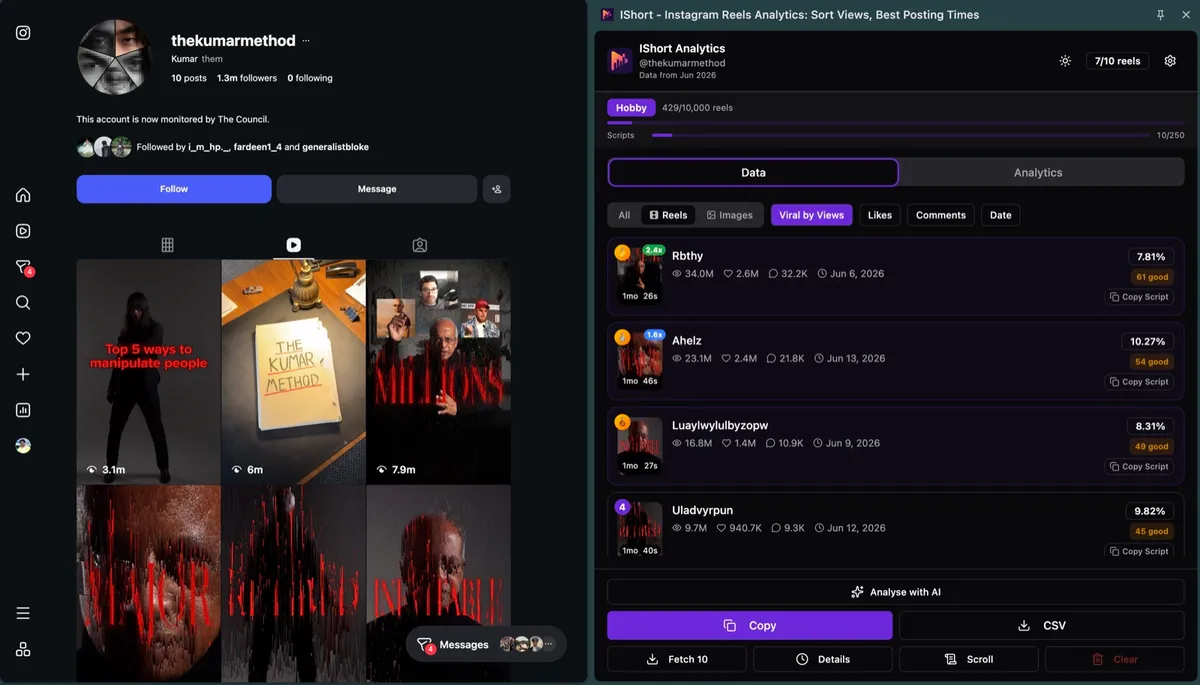
Quick answer: Instagram engagement rate = (likes + comments) / views x 100 for a Reel, or (likes + comments) / followers x 100 for an account. Type the numbers into the calculator below. For creators with 5,000-50,000 followers, about 2.5-3.5% is typical (HypeAuditor). Want it for every Reel of an account without typing? The free IShort extension shows engagement % on every Reel of any public profile.
Calculate Your Engagement Rate
Enter one Reel's numbers (or an account's averages). Views or followers is required; the rest are optional.
The Engagement Rate Formula (Three Versions)
There is no single official formula; Instagram does not publish one. These are the three versions you will meet, and the calculator shows all of them:
| Version | Formula | Use it for |
|---|---|---|
| By views | (likes + comments) / views x 100 | A single Reel. This is what HypeAuditor now uses for accounts that post Reels, and what the IShort extension shows on every Reel card. |
| By followers | (likes + comments) / followers x 100 | Comparing accounts, and older benchmarks (most published tier tables were built this way). |
| Full, by views | (likes + comments + shares + saves) / views x 100 | Your own Reels, where Insights shows shares and saves. Higher than the other two, so don't compare it with benchmarks built on likes and comments only. |
Worked example: a Reel with 10,000 views, 500 likes and 25 comments on an account with 5,000 followers has an engagement rate of (500 + 25) / 10,000 x 100 = 5.25% by views and (500 + 25) / 5,000 x 100 = 10.5% by followers. The by-followers number is higher because the Reel reached twice as many people as the account has followers. For Reels, reach is decoupled from follower count, which is why the by-views version is usually the fairer one.
Account engagement rate: average the per-post numbers over the last 10-20 posts rather than using one post; one viral Reel can double an account's average.
Instagram Engagement Rate Benchmarks by Follower Tier
Smaller accounts engage at higher rates in every published study; how much higher depends on the dataset and formula. The ranges below are HypeAuditor's published "rough benchmarks" (HypeAuditor, updated May 2026). The calculator uses them for its verdict when you enter a follower count.
| Follower tier | Followers | Typical engagement rate | Clearly above typical |
|---|---|---|---|
| Nano | 1K - 5K | 4% - 5% | above 5% |
| Micro | 5K - 50K | 2.5% - 3.5% | above 3.5% |
| Mid-tier | 50K - 500K | 2% - 2.5% | above 2.5% |
| Macro / mega | 500K+ | 1% - 2% | above 2% |
| Brand accounts | any | 0.5% - 1% | above 1% |
Read benchmarks with care. Other studies publish much lower medians because they divide by followers and include inactive accounts; Reels-heavy creators measured by views usually come out higher. Compare like with like: the same formula, the same content type, and ideally accounts in your own niche. The fastest way to get a niche benchmark is to open 3-5 public accounts in your niche with the free IShort extension and read the engagement % on their Reels. For more context on what counts as good, see what is a good engagement rate on Instagram.
Engagement Rate by Industry (Editorial Ranges)
These ranges are IShort's editorial estimates to help you sense-check a number, not a measured study. Use a niche sample (above) when the decision matters.
| Industry / Niche | Average Engagement Rate |
|---|---|
| Education | 3.5% - 5.0% |
| Fitness & Health | 2.5% - 4.0% |
| Food & Cooking | 2.0% - 3.5% |
| Fashion & Beauty | 1.5% - 3.0% |
| Travel | 2.0% - 3.5% |
| Business / B2B | 1.0% - 2.5% |
| Entertainment / Comedy | 3.0% - 6.0% |
| Technology | 1.5% - 2.5% |
Why Instagram Doesn't Show Your Engagement Rate
Instagram Insights shows likes, comments, shares, saves and reach for each of your own posts, but it never divides them into a rate, never compares one Reel with another, and only works on a Business or Creator account. For anyone else's account it shows nothing beyond the public counts. That is why people use calculators like this one, and why the IShort extension exists: it reads the public views, likes and comments of every Reel on any public profile and shows the engagement % on each one, plus the account average, a views-vs-engagement scatter and an engagement trend.
This Calculator vs Handle-Based Calculators vs the IShort Extension
| This calculator | Handle-based web calculators (e.g. HypeAuditor) | IShort extension | |
|---|---|---|---|
| What you enter | Your own numbers | An @handle | Nothing; open the profile |
| Per-Reel rates | One at a time | Usually an account average | Every Reel, sortable |
| Works on any public account | Yes, if you copy the numbers | Yes | Yes |
| Export | No | Varies by tool | CSV / Google Sheets |
| Cost / login | Free, no login | Varies by tool | Free plan (500 reels), no Instagram login |
Get engagement % for every Reel, automatically
- Install IShort from the Chrome Web Store (free; also on Edge).
- Open instagram.com/username/reels/ for your account or any public account.
- Open the IShort side panel: every Reel shows its views, likes, comments and engagement %. Sort by views or Viral Score to see which Reels beat the account average.
How to Improve Your Instagram Engagement Rate
If your engagement rate is below average, here are proven strategies to boost it:
- Post at your best times - Use IShort's posting heatmap to find when your audience is most active
- Create Reels under 30 seconds - Short Reels get higher completion rates, which boosts engagement signals
- Start with a strong hook - The first 1-2 seconds determine if someone watches or scrolls past
- Use call-to-actions - Ask questions, prompt saves ("save this for later"), and encourage shares
- Reply to every comment - Each reply counts as an additional engagement, and it encourages more comments
- Analyze your top performers - Use IShort to find your highest-engagement Reels and replicate their patterns (topic, length, format, audio)
- Use relevant hashtags - Instagram allows up to 5 per post; IShort's hashtag analytics shows which ones were on your best Reels
- Post consistently - A steady rhythm (many creators aim for 3-5 Reels a week) gives you enough posts to learn from
Engagement Rate vs. Reach Rate
Engagement rate by reach, (interactions) / accounts reached x 100, is the most accurate version, but reach is private: only the account owner sees it in Insights. Use it for your own Reels; use the by-views version for everyone else. Instagram's head Adam Mosseri has said likes per reach and sends per reach are among the signals that matter most for ranking, which is why reach-based engagement tracks distribution so closely. More in what accounts reached means.
Why Engagement Rate Matters More Than Follower Count
In 2026, brands and sponsors prioritize engagement rate over raw follower count when selecting creators for partnerships. Here's why:
- Proof of a live audience - A creator with 10K followers and 5% engagement often has a more active audience than one with 100K followers and 0.5%
- Authentic audience - High engagement signals a real, interested audience (not bots or inactive followers)
- Algorithm favor - Instagram pushes high-engagement content to more people, creating a growth flywheel
- Sponsorship rates - Many brands use engagement rate tiers to determine partnership pricing
Pro Tip: Track your engagement rate over time, not just for individual posts. IShort's engagement trend chart shows how engagement moves across recent Reels so you can measure the impact of your content strategy.
Engagement Rate Calculator FAQ
Should I include shares and saves?
Include them for your own Reels if you want the fullest picture, but compare the result only with other numbers calculated the same way. Most benchmarks, and most public tools, use likes and comments only, because shares and saves are not always public.
Why is my rate by followers higher than 100%?
Because a Reel can reach far more people than follow you. If a Reel gets 50,000 views and 6,000 likes on a 5,000-follower account, likes alone are 120% of followers. Use the by-views rate for Reels.
Can I calculate a competitor's engagement rate?
Yes. Views, likes and comments are public on most Reels, so copy them into the calculator, or open the account with IShort to see the rate on every Reel at once. Shares, saves and reach are private, so any tool that shows those for someone else's account is estimating.
How many posts should I average?
Ten to twenty recent posts of the same type. Mixing Reels with photo posts, or including one viral outlier, skews the average; the median is often a better summary. See the Reels outlier score for how to spot outliers.