

Quick answer: Instagram has never officially used the word "shadowban." What creators call a shadowban is really content being made "not eligible to be recommended" - your posts stay visible to your existing followers, but Instagram can keep them out of Explore, the Reels tab, and hashtag results for people who do not follow you. The one definitive way to check is Settings -> Account Status, which shows whether your content can be recommended and lets you appeal. Below: how to know if you are shadowbanned, the honest truth behind the "3 signs," and how to recover.
How to know if you are shadowbanned
Forget the third-party "shadowban testers" - none of them can see how Instagram is treating your account. The fastest and most reliable check is Instagram's own Account Status tool, which tells you directly whether your recent content is eligible to be recommended to people who do not already follow you.
- Open Account Status. Go to your profile, tap the menu, then open Settings and privacy and look for Account Status (on some versions it sits under "Account" or the professional dashboard). This is Instagram's official transparency panel.
- Read the recommendation section. Account Status tells you whether your content is currently eligible to be recommended. If something you posted was found to go against the Recommendation Guidelines, it is listed here.
- Appeal anything flagged. If a post is marked as not recommendable and you believe that is a mistake, you can request a review right from Account Status. That is the closest thing to an official fix-a-shadowban button that exists.
- Cross-check your own numbers. Watch for a sudden drop in reach from non-followers, posts that stop appearing under hashtags you use, or an unusual engagement dip. Treat these as clues to investigate - not proof - and confirm with Account Status.
Instagram documents all of this in its Help Center under content that is not eligible to be recommended. That page, not any external tester, is the source of truth for what Instagram will and will not push to non-followers.
The truth: Instagram has no official "shadowban"
Here is the part most guides get wrong. Instagram has never used the term "shadowban," and it does not describe shadowbanning as a feature. What it does say is that not all content is eligible to be recommended. Recommendations are the posts Instagram shows to people who do not follow you - in Explore, in the Reels tab, and in some hashtag and search surfaces.
So the mechanism people describe as a shadowban is real, but the official framing is different. Your post is not deleted and it is not hidden from your followers. It is simply held back from the surfaces that reach new audiences. That is why a "shadowbanned" account can still look normal to its own followers while its reach quietly collapses.
3 signs you may be shadowbanned (and what they really mean)
1. Reach drops among non-followers
Your insights show a sudden fall in reach or views coming from accounts that do not follow you, while follower reach holds steady. This is the most telling of the three - recommendations are exactly what gets limited.
2. You vanish from hashtags
Posts you tagged stop showing up under those hashtags for other people. Hashtag and search results are recommendation surfaces, so being left out of them can signal reduced eligibility.
3. An unusual engagement dip
Likes, comments, and saves fall well below your normal range for no obvious reason. On its own this is weak evidence - engagement swings for many reasons - but paired with the first two it is worth a look.
Treat all three as possible indicators of reduced recommendation, not as a diagnosis. Reach naturally rises and falls, and a slow week is not a ban. The honest answer is always the same: open Account Status. It is the only place that tells you whether Instagram has actually limited your content.
Why content gets left out of recommendations
Instagram's Recommendation Guidelines describe the kinds of content it will not push to non-followers. If a recent post brushes against them - even mildly - your reach to new audiences can be dialed back. The three common buckets:
| Why reach can be limited | What it looks like | What to do |
|---|---|---|
| Sensitive or borderline content | Content that is not against the rules outright but sits close to the line - for example sexually suggestive, shocking, or misinformation-adjacent posts. | Edit or remove it; keep future posts clearly inside the guidelines. |
| Low-quality or reposted content | Watermarked clips, blurry re-uploads, or content clearly recycled from other apps. | Post original, high-quality footage rather than visibly reposted clips. |
| Spammy behavior or hashtags | Banned or broken hashtags, rapid mass-following, or repetitive posting patterns. | Drop risky hashtags and slow down automated-looking activity. |
How to recover and get your reach back
- Check Account Status and appeal. Open Settings -> Account Status, review anything flagged as not recommendable, and request a review for anything you think is wrong.
- Remove or edit flagged content. Take down the specific posts Account Status names, or edit captions and hashtags that may have tripped the guidelines.
- Avoid banned and spammy hashtags. Stop reusing the same block of tags on every post, and steer clear of hashtags Instagram has restricted.
- Follow the Recommendation Guidelines. Keep new content clearly inside what Instagram is willing to recommend, so nothing new gets held back.
- Post original content and give it time. Share original, high-quality posts and keep engaging normally. Eligibility is re-evaluated on recent activity, so recovery tends to be gradual rather than instant.
Where analytics fit: spotting a reach drop early
Analytics will not tell you that you are shadowbanned - only Account Status does that. What analytics can do is help you notice the dip early and figure out which posts or hashtags may be limiting your reach. The free IShort Chrome extension is useful here as an early-warning diagnostic: open any public Instagram profile - your own included - and see views and engagement laid out for every recent Reel, so a sudden divergence jumps out instead of hiding in the app.
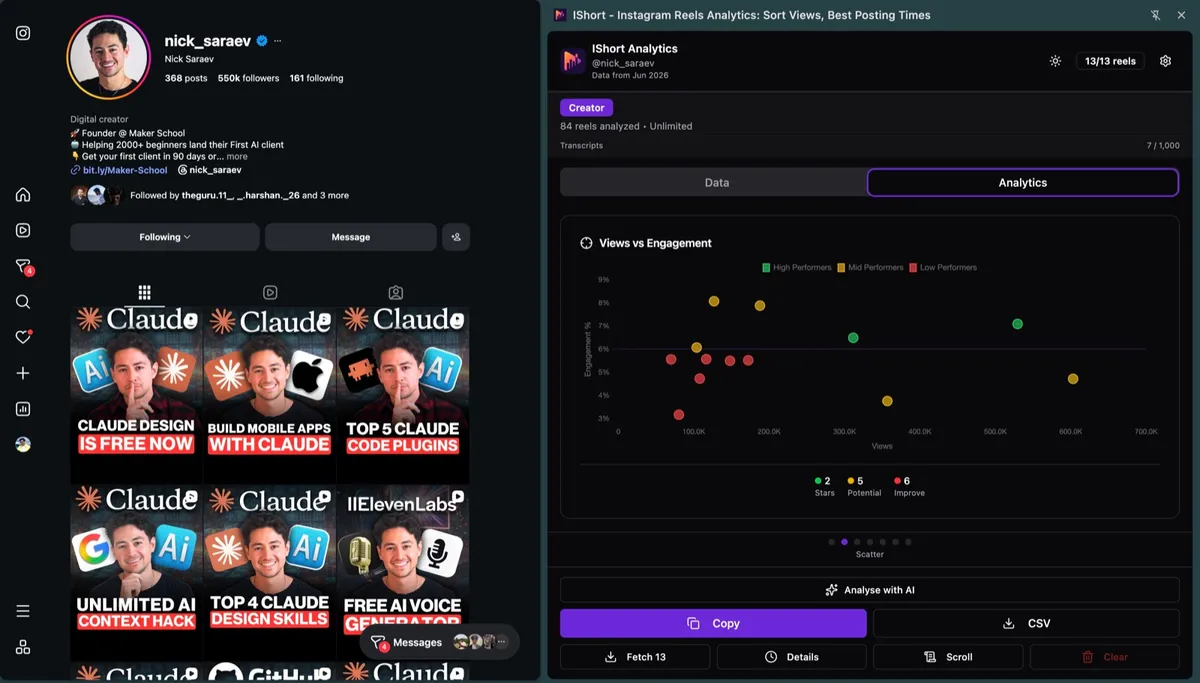
From there you can audit the pattern - did reach fall right after a batch of posts that leaned on the same risky hashtags? - and then confirm the official picture in Account Status. To be clear: IShort is a diagnostic that helps you spot and investigate a drop; it does not detect or fix a shadowban, and it is no substitute for Instagram's own Account Status check. Pair it with our guides on why Reels get no views and getting more views on Reels.
Spot a reach drop before you guess
Install IShort free and watch views and engagement for any public profile - your own included. It is a diagnostic to catch a sudden dip early; Instagram's Account Status stays the definitive check.
Add to Chrome - Free Add to Edge - FreeFrequently Asked Questions
What is an Instagram shadowban?
Instagram has never officially used the word shadowban. What people call a shadowban is content being made not eligible to be recommended: your posts stay visible to your followers, but Instagram may keep them out of Explore, the Reels tab, and hashtag results for people who do not follow you. This can happen when content is sensitive, low quality, or vaguely brushes against Instagram's Community Guidelines or Recommendation Guidelines.
How do I know if I am shadowbanned?
The definitive check is Settings then Account Status, which tells you whether your content is currently eligible to be recommended and lets you appeal if it is not. Third-party shadowban testers cannot see this and often just guess. Beyond Account Status, a sudden drop in reach among non-followers, your posts not appearing under hashtags you used, or a sharp engagement dip can be possible indicators worth investigating.
What are the signs of a shadowban?
The three most common signs people report are a sudden drop in reach or views coming mostly from non-followers, your posts no longer showing up under the hashtags you add, and an unusual engagement dip. Treat these as possible signals of reduced recommendation rather than proof, and confirm with Account Status, which is the only official source.
How do I fix or recover from a shadowban?
Open Settings then Account Status and appeal any content flagged as not recommendable, then remove or edit posts that may break the guidelines. Stop using banned, broken, or spammy hashtags, keep to Instagram's Recommendation Guidelines, and post original content rather than reposted or watermarked clips. Recovery is usually gradual as Instagram re-evaluates your recent activity.
Does Instagram officially confirm shadowbanning?
No. Instagram has never used the term shadowban and does not confirm it as a feature. It does say that some content is not eligible to be recommended to people who do not follow you, and it exposes that status in Account Status. So the mechanism people describe as a shadowban is real, but the official framing is about what can and cannot be recommended.
Final thoughts
The word "shadowban" makes it sound like a switch Instagram flips in secret. The reality is calmer and more useful: your content can be made not eligible to be recommended, which quietly cuts your reach to non-followers while leaving your followers unaffected. Do not trust third-party shadowban testers. Open Account Status, appeal anything flagged, tighten up your content and hashtags, and keep posting original work. Use analytics to catch the dip early - then let Instagram's own tools tell you the truth and guide the fix.