
Quick answer: IShort Link in Bio is a 100% free tool that gives you one clean page at ishort.pro/you to hold all your links. You get up to 20 links, social icons, custom themes, a QR code, and free per-link click analytics — the part most link-in-bio tools charge for. Sign in with Google and your page is live in under a minute.
What is IShort Link in Bio?
A link in bio is a single web page that collects all of your important links in one place. Instead of constantly swapping the one link your Instagram or TikTok profile allows, you point that spot to your bio page — and visitors get a tidy menu of everything you want to share: your latest video, your other socials, a newsletter, a shop, a booking link, whatever matters right now.
IShort Link in Bio is our take on that idea, built to be genuinely free. There is no Pro tier waiting to unlock the useful features, and no fees skimmed off your links. You claim a username, add your links, pick a look, and share the page. It is part of IShort, a small suite of tools for creators that also includes an Instagram Reels analytics extension.
Everything you get
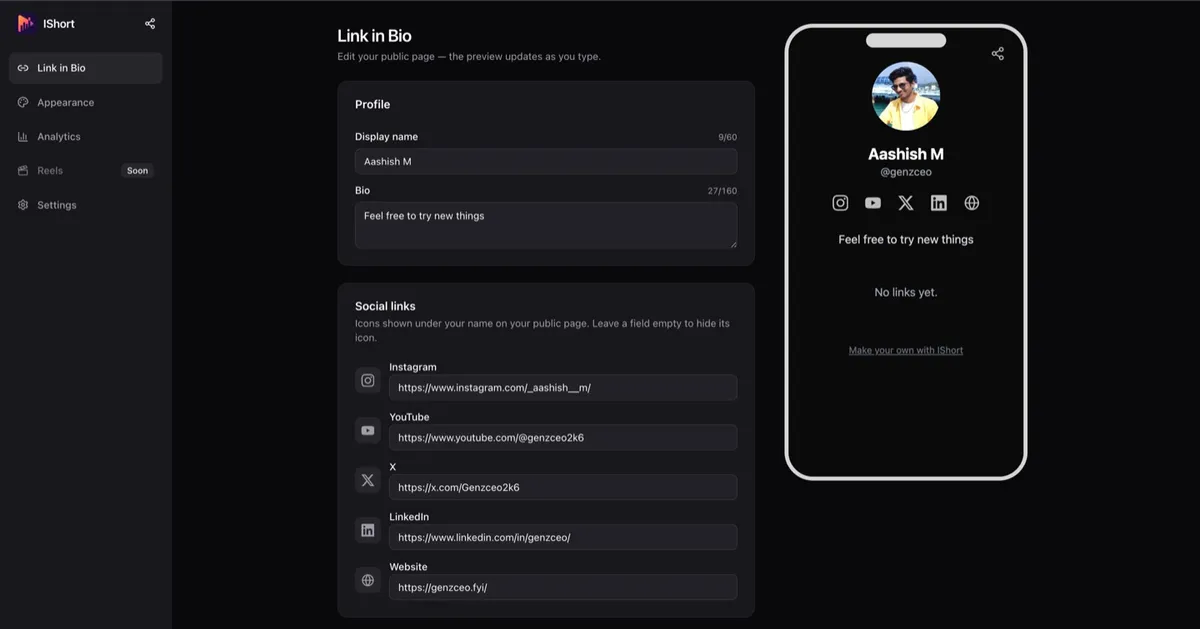
The editor keeps things simple: a profile at the top, your links below, and a live phone preview so you always see exactly what visitors will see.
- Up to 20 links — each with a title and URL. Drag and drop to reorder, and paste URLs however you like (the input is forgiving about
https://and typos). - 5 social icons — Instagram, YouTube, X, LinkedIn, and your personal website, shown as clean icons at the top of your page.
- Profile basics — a display name (up to 60 characters), a short bio (up to 160), and an avatar you can upload (up to 2 MB) or pull from your Google photo.
- A QR code — download a PNG from the Share dialog for print, packaging, or a slide, plus a native share button.
Create your free link in bio
Claim your ishort.pro/you page in under a minute — free, with click analytics built in.
Get your free page →Free analytics: the part everyone else charges for
This is the wedge. On most link-in-bio tools, seeing which of your links people actually click is a paid feature — Linktree, for example, puts per-link clicks and click-rate behind Linktree Pro. IShort gives you that for free.
Your dashboard shows page views, total link clicks, and your click-rate (CTR), with 7, 30, and 90-day ranges and deltas so you can see whether things are trending up. An activity chart shows movement over time, and a per-link table (plus your social icons) tells you exactly which links earn taps and which ones don't.
To keep the numbers honest, bot and crawler traffic is filtered out. And to be clear about what this is: the analytics are aggregate counts. IShort does not track individual visitors, their location, device, or where they came from — only you can see your stats, and no visitor cookies or third-party trackers run on your public page.
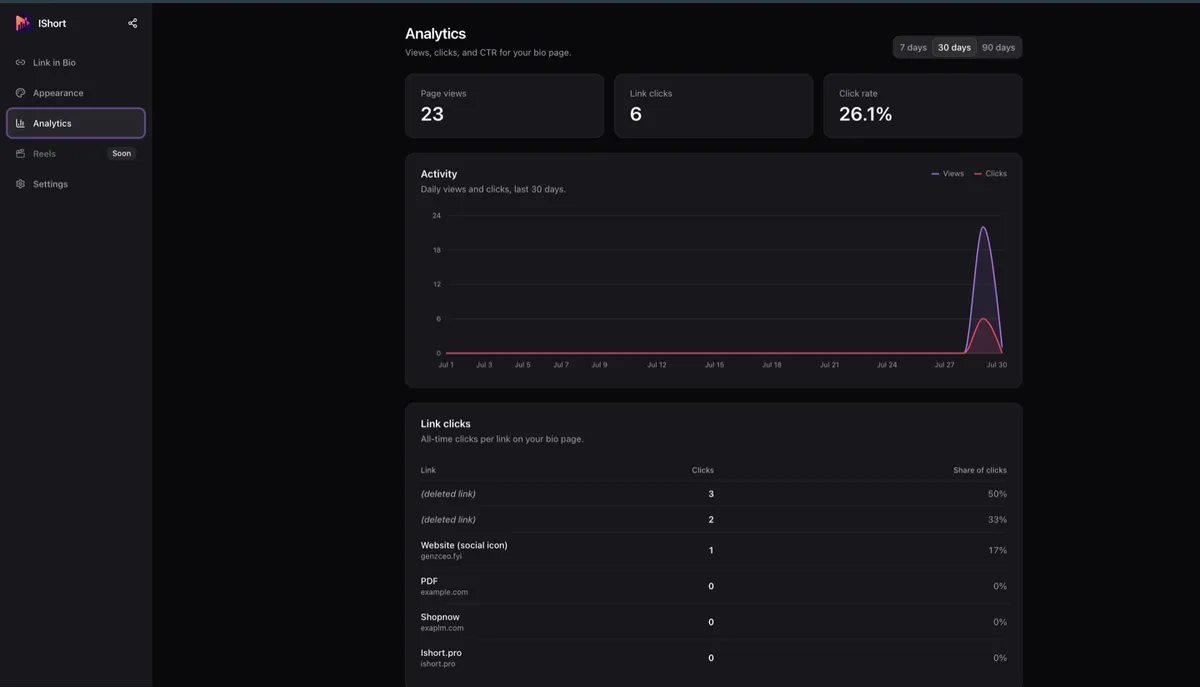
If click data matters to you, that free analytics table is the reason to try IShort over a free Linktree alternative that hides it, or a Beacons alternative that pushes you toward a paid plan.
Appearance and themes
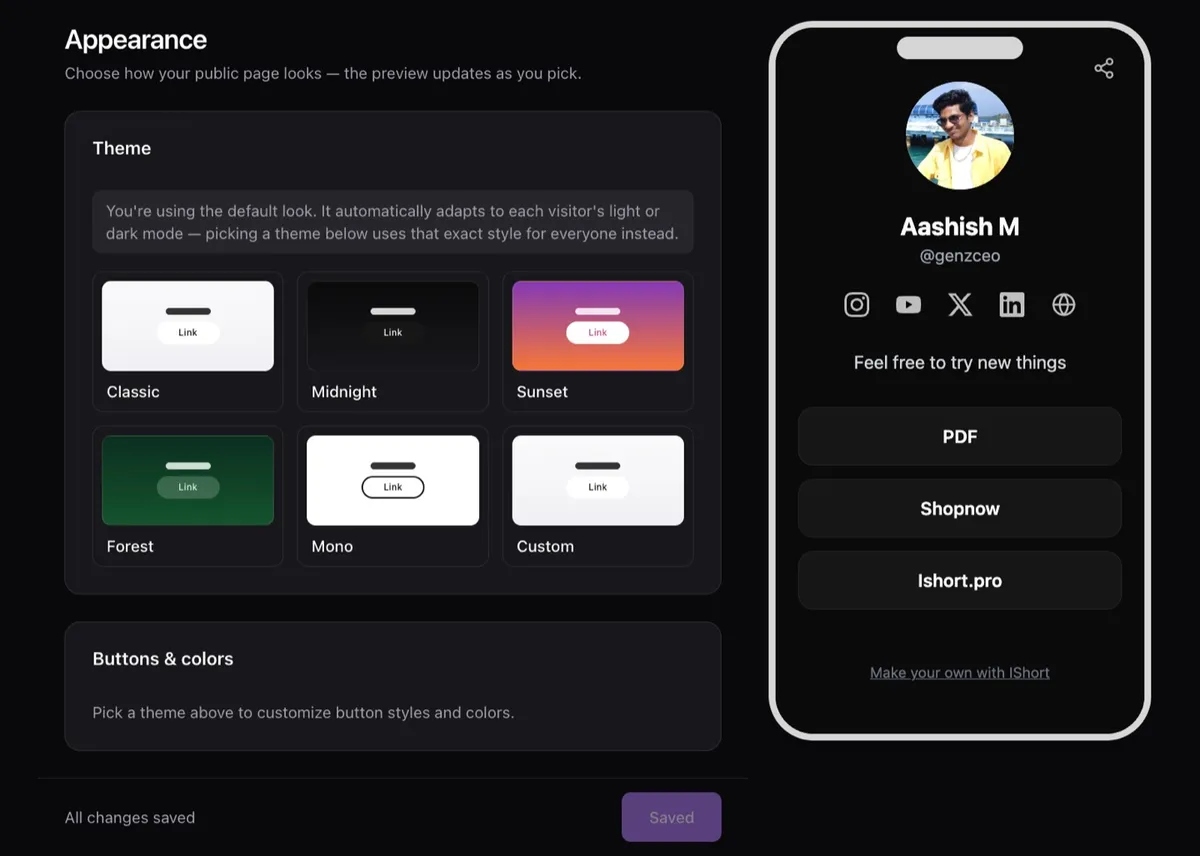
Your page should look like you, not like a template everyone shares. IShort ships with 5 theme presets — Classic, Midnight, Sunset, Forest, and Mono — plus a Custom theme with hex color pickers so you can match your brand exactly.
You also control button style (solid, outline, or soft) and shape (rounded, curved, or pill). By default your page adapts to each visitor's light or dark mode, so it always looks intentional. Every change previews live in the phone mockup as you make it.
How it works in 3 steps
- Claim your ishort.pro/you page. Sign in with Google and pick a username (3–24 characters, lowercase letters, numbers, and underscores). Your public page lives at ishort.pro/username — you can see and copy that address any time in Settings.
- Add your links. Drop in up to 20 links, add your social icons, set your name, bio, and avatar, then pick a theme. The live preview shows exactly how it will look.
- Share it everywhere. Paste your ishort.pro/you link into your Instagram or TikTok bio, hand out the QR code, or use the share button. Edits go live to visitors within about 60 seconds.
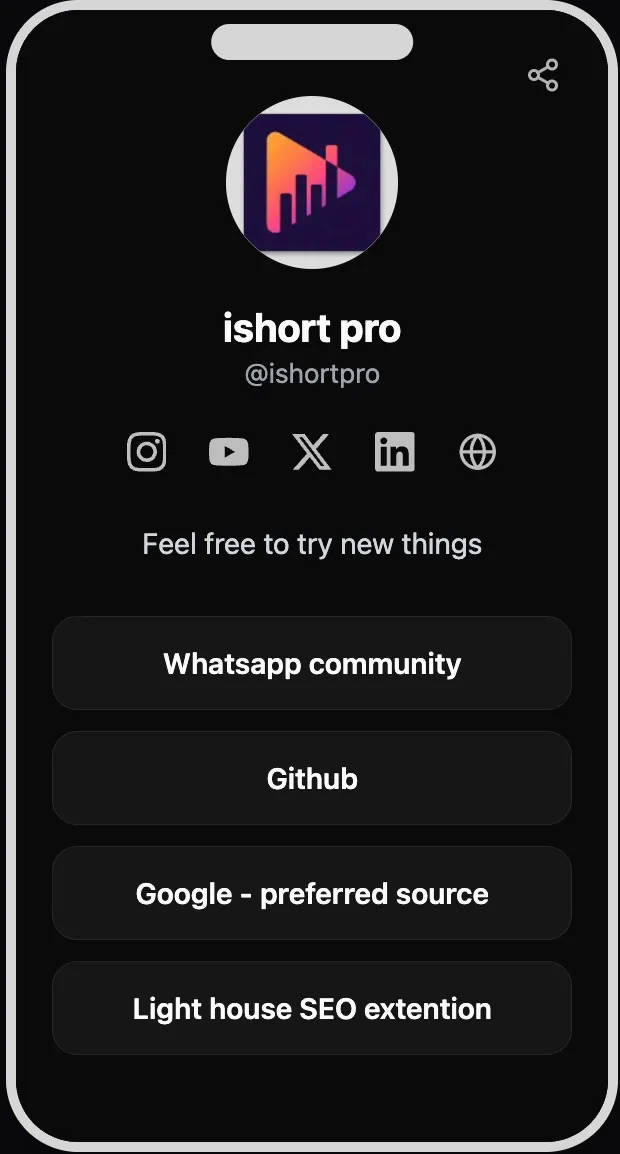
The public page is clean for visitors, too. There are no visitor cookies and no third-party trackers running on it, so the people tapping your links are not being followed around the web on your behalf. The only analytics collected are the aggregate click counts you see in your own dashboard. Editing your page always happens behind a free Google sign-in, so nobody but you can change what visitors see.
Who it's for
Instagram & TikTok users
You get one clickable link in your bio. Use it to hold everything. It even works inside the Instagram in-app browser, where some tools stumble.
Creators
Send followers to your latest video, all your socials, and your collabs from one page — and see what they actually click. See the creator guide.
Anyone starting out
No budget needed. New to this? Read how to add a link in bio on Instagram step by step.
Quick comparison vs other tools
Most link-in-bio tools do the basics well. Where they differ is price and what they lock behind a paid plan. Here is an honest look at how IShort compares on the features people search for.
| Feature | IShort | Typical free tier elsewhere |
|---|---|---|
| Price | Free | Free, with paid upsell |
| Per-link click analytics | Included free | Often paid (e.g. Linktree Pro) |
| Click-rate (CTR) | Included free | Often paid |
| Custom theme colors | Yes (hex pickers) | Sometimes paid |
| QR code | Yes | Varies |
| Fees on your links | None | Sometimes (commerce tools) |
To be fair, bigger platforms offer things IShort does not: a storefront and monetization, third-party integrations, and more. IShort deliberately stays a clean, free link page with real click analytics. If that trade sounds right, compare the details on our Linktree alternative and Beacons alternative pages.
Making your page work harder
A link in bio is only as good as the decisions you make with it, and that is where the free analytics quietly earn their keep. Because you can see click-rate per link, you stop guessing about what your audience wants and start responding to it. If your newsletter link pulls a 4% click-rate while your merch link sits near zero, that is a signal — move the newsletter to the top, rewrite the merch label, or drop it entirely and give the slot to something people actually tap.
A few habits make the biggest difference:
- Order by intent. Put the one thing you most want people to do at the very top. The first two or three links get the vast majority of clicks.
- Write labels like calls to action. “Watch my latest video” beats “YouTube.” Clear beats clever.
- Keep the list short. You can add up to 20 links, but fewer, sharper links almost always out-click a long menu. Prune the ones the analytics show nobody uses.
- Rotate with your content. When you post a new video or launch, swap the top link to match, then check the click table a few days later to see if it landed.
None of this requires a paid plan or a spreadsheet. You edit the page, changes go live to visitors within about 60 seconds, and the numbers update as people tap. If you want deeper platform-specific tips, our guides on link in bio for Instagram and link in bio for creators go further.
Create your free link in bio
Claim your ishort.pro/you page in under a minute — free, with click analytics built in.
Get your free page →FAQ
Is IShort Link in Bio really free?
Yes. The link-in-bio tool is 100% free with no plan gating. Every feature — links, social icons, themes, QR code, and analytics — is included at no cost. All you need is a free Google sign-in.
What is my link-in-bio URL?
Your public page lives at ishort.pro/username. You choose the username (3 to 24 characters, lowercase letters, numbers, and underscores) when you sign in, and you can see and copy the full address any time in Settings.
How many links can I add?
You can add up to 20 links, each with a title and URL, and drag and drop to reorder them. You also get 5 social icons: Instagram, YouTube, X, LinkedIn, and your personal website.
Do I need the IShort Chrome extension to use the link in bio?
No. The link-in-bio tool works entirely on the web with a free Google sign-in. The Chrome extension is a separate IShort product for Instagram Reels analytics and is not required for your bio page.
Can I see which links get clicked?
Yes, for free. Your dashboard shows page views, total link clicks, and click-rate, plus a per-link and per-social-icon table so you can see which links earn taps. The numbers are aggregate counts with bot traffic filtered out.
Does it work with Instagram?
Yes. Paste your ishort.pro/you link into your Instagram bio to turn your one allowed link into a menu of all your links. It even works inside the Instagram in-app browser, where sign-in falls back to a redirect.