
Quick answer: YouTube doesn't have a single "bio," so creators use one free IShort page — ishort.pro/you — as the link they drop into video descriptions, the channel About section, community posts, and Shorts. It holds all your videos, channels, socials and sponsor links in one place, and shows free per-link click analytics so you can see which links actually convert.
Unlike Instagram or TikTok, YouTube doesn't give you a classic bio with one link field. Instead your links are scattered across several surfaces: the channel About section, the top of every video description, community posts, pinned comments, and the tiny amount of room you get on Shorts. Maintaining a different set of URLs in each of those places is a losing battle — they go stale the moment your priorities change.
The move most creators land on is a single link-in-bio page: one short URL you paste everywhere, backed by a page you can update in seconds. Change the page once and every description, post, and comment that points to it is instantly up to date. IShort gives you that page for free.
Get your free links page for YouTube
Claim ishort.pro/you in under a minute — free, with per-link click analytics built in.
Get your free page →Where a YouTube creator uses one link
One IShort page covers every YouTube surface at once:
- Video descriptions. Put your page link in the first line or two — that's what shows before viewers tap "Show more."
- Channel About section. A single, clean link that never needs re-editing when your offers change.
- Community posts & Shorts. One memorable link (ishort.pro/you) you can say out loud or type quickly.
- Pinned comments. The second-most-tapped spot on YouTube — one link there sends viewers to everything.
What to put on your YouTube links page
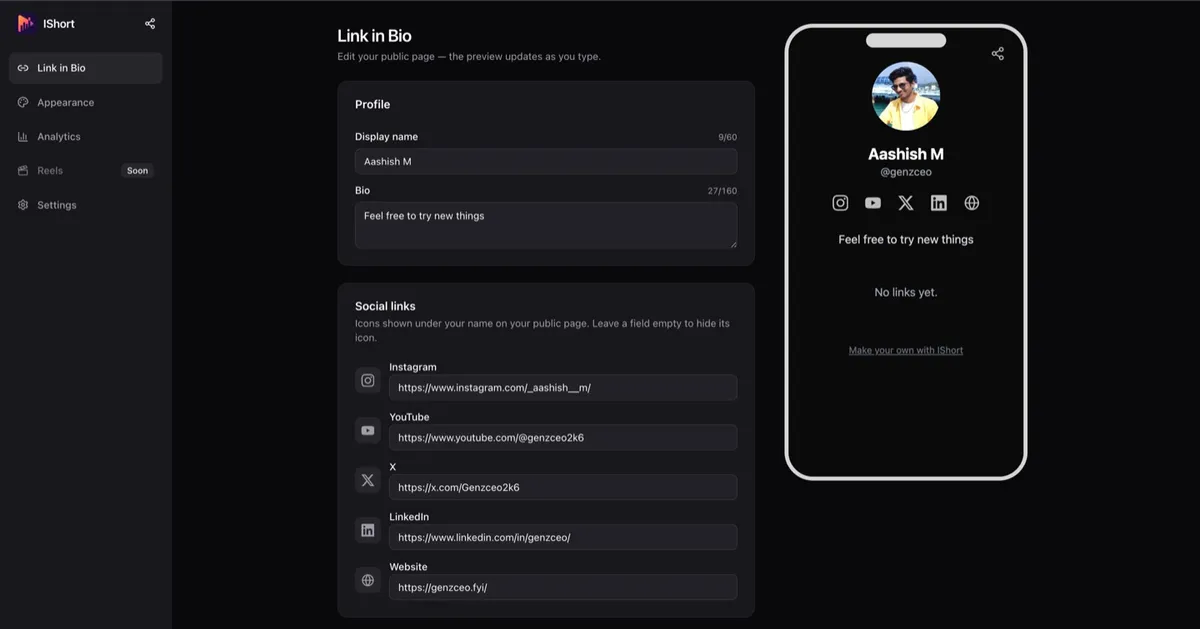
You get up to 20 links plus five social icons (Instagram, YouTube, X, LinkedIn, website). The label matters more than creators expect — "Website" is dead text, while "Get the free Notion template" is a click. A strong YouTube bio page usually includes:
- Your newest video or playlist at the top — the one thing you want people watching right now.
- Your other channels and platforms — a second channel, your podcast, Instagram, and the rest.
- Sponsor and affiliate links — give each sponsor its own clearly labeled button so you can prove clicks.
- Merch, gear lists, and courses — wherever you already sell.
- Your email signup — IShort has built-in email capture with CSV export, so YouTube viewers become subscribers you own.
Use emoji and section headers to group a longer list (Watch, Shop, Follow), and keep the prominent slots for evergreen anchors like your main site and press page.
See which links actually convert
This is where a free page earns its place. IShort's analytics (visible only to you) show page views, total link clicks, and your click-rate, across 7, 30, and 90-day ranges with deltas and a time-series chart. A per-link and per-social table tells you exactly which buttons your viewers tap.
For a YouTuber that's gold: you can see whether your sponsor link out-performs your merch link, whether a given video is actually driving clicks, and — via the traffic sources and countries views — how much of your click traffic comes from YouTube versus elsewhere. Bot traffic is filtered out, and the numbers are aggregate only, so you get real signal without profiling individual viewers.
Schedule links around launches
Launching a course, a video, or a sponsor campaign? With per-link scheduling you can set a link to appear and disappear on its own — so a pre-order button goes live the moment your launch video drops and a limited sponsor link comes down when the deal ends, without you editing anything at midnight. Combined with a 1024px QR code for on-screen end cards and offline events, one page keeps up with your whole publishing calendar.
Make it match your channel
Your links page is an extension of your channel, so it shouldn't look like a generic template. Pick from five theme presets — Classic, Midnight, Sunset, Forest, and Mono — or build a Custom theme with hex color pickers to match your channel art and thumbnails exactly. You control the button style (solid, outline, or soft) and shape (rounded, curved, or pill), and the default look adapts to each visitor's light or dark mode.
You also get a profile photo (up to 2MB), your name, and a 160-character bio at the top, plus a share button so viewers can pass your page along. And because the page is server-rendered and tiny (about 15KB) with no cookies or trackers, it loads fast and behaves correctly inside the in-app browsers your viewers use when they open a link from the YouTube app on their phone — a place where heavier link tools often stumble.
Free means free
There's no plan gating and nothing skimmed from your income — IShort isn't a payment platform, so it never touches what you earn from sponsors, merch, or courses; you simply link out to wherever you already get paid. To be clear about what it is not: there's no built-in checkout, storefront, custom domain, or link thumbnails. If you want a clean, fast links page with real click analytics and zero fees to drop across all your YouTube surfaces, that's exactly what this is.
Ready to build your YouTube links page?
Claim ishort.pro/you, add your links, and see which ones convert — all free.
Get your free page →FAQ
Can I use a link in bio for YouTube?
Yes. YouTube doesn't have a single bio field, but you can paste one link-in-bio URL (like ishort.pro/you) into your video descriptions, channel About section, community posts, pinned comments, and Shorts. That one page then links out to everything else — your videos, other channels, socials, and sponsors.
What should I put in a YouTube link in bio?
Lead with your newest video or playlist, then add your other channels and platforms, your sponsor and affiliate links (each clearly labeled), any merch or courses, and an email signup. You get up to 20 links plus five social icons, and you can group them with section headers and emoji.
Is it free?
Yes — 100% free. You get up to 20 links, social icons, five themes plus custom colors, per-link scheduling, email capture with CSV export, a QR code, and click analytics without paying anything. All you need is a free Google sign-in.
Does it track clicks?
Yes. IShort gives you free analytics — page views, link clicks, click-rate, a per-link table, and traffic sources and countries — across 7, 30, and 90-day ranges, so you can see which links convert. Counts are aggregate only and filter out bots; they don't identify individual visitors.