

Quick answer: To download all Reels from a public Instagram profile, install the free IShort extension for Chrome or Edge, open the profile's /reels/ page, scroll to load the Reels, then download them from the IShort panel. It works right in the browser with no login, no watermark, no app, and no API, and it can grab photos and carousels too. IShort only downloads public content you can already view - it does not unlock private accounts.
Instagram has no "download all my Reels" button
If you have ever tried to save an entire profile's Reels, you already know the problem: Instagram gives you no bulk download option. You can save a Reel to your own collections inside the app, but that keeps it locked inside Instagram - there is no way to pull the actual video files out, one by one or in bulk, to your computer. Screen-recording each Reel is slow and lossy, and most "online Instagram downloader" sites make you paste a single URL at a time, wrap the file in ads, or add a watermark.
The clean fix is to do the downloading inside your own browser, on the profile page you are already looking at. That is exactly what IShort does.
How to do it with IShort: install the free IShort extension, open the profile's instagram.com/username/reels/ page, scroll down to load the Reels you want to capture, then use the download control next to each Reel in the IShort panel. Everything happens locally in Chrome or Edge - no account, no upload to a third-party server, and no watermark on the files you save.
Get the free downloader in one click
Add IShort to your browser and start saving Reels, photos, and carousels from any public profile - no login, no cost.
Add to Chrome - Free Add to Edge - FreeHow to download all Reels from a profile (step by step)
- Install IShort (free). Add it from the Chrome Web Store or the Edge Add-ons store. There is no account to create and nothing to configure.
- Open the profile's /reels/ page. Go to instagram.com/username/reels/ for the public profile you want. This is the Reels tab, where IShort reads the Reels it can see.
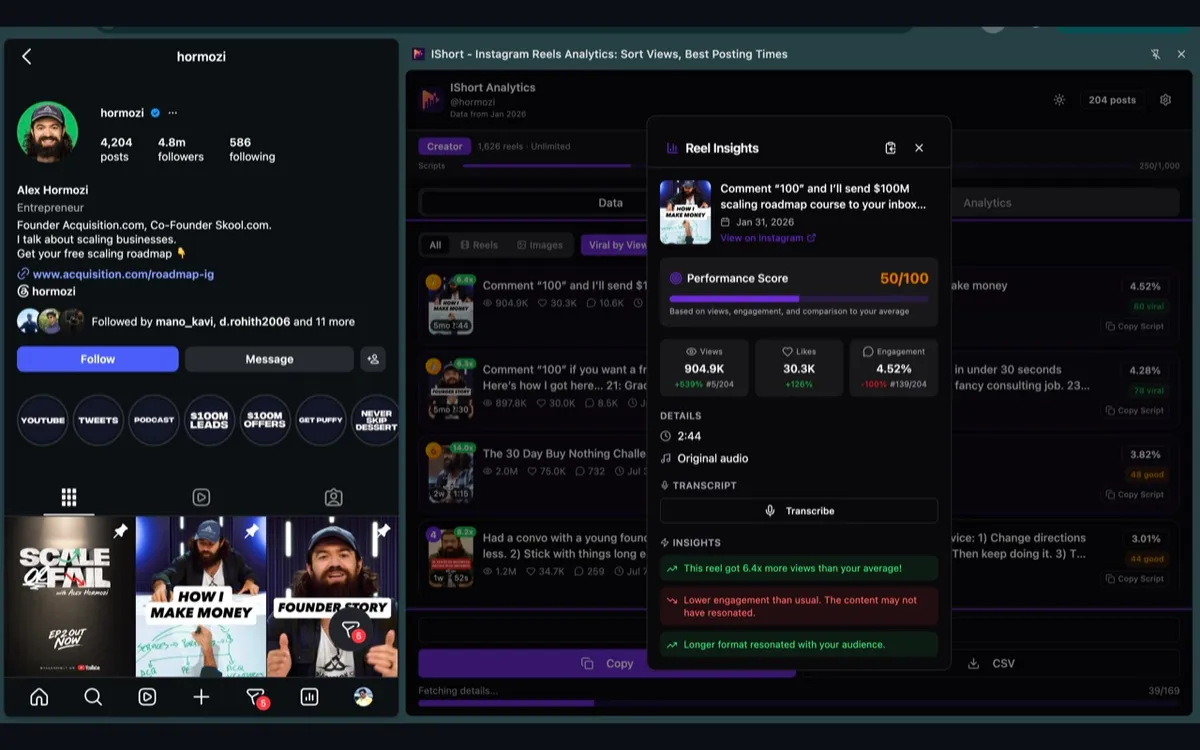
- Scroll to load the Reels. Instagram loads Reels in batches as you scroll, so scroll to the bottom of the /reels/ page to bring the whole library into view. IShort captures each Reel as it appears and lists it in the panel with its details.
- Select and download. Open the IShort panel and use the download control next to each Reel. Save individual Reels, or work down the list to grab the full set - the files land in your browser's downloads folder as the original video, with no watermark added.
Because Reels load progressively, the rule of thumb is simple: if you can scroll to it, IShort can list it. Scroll all the way down before you start downloading so nothing gets missed.
IShort vs online downloaders vs screen-recording
There is more than one way to save Reels, but they are not equal. Here is how the browser-extension approach compares to the two most common alternatives:
| Method | Bulk from a profile? | Watermark / quality | Login / privacy |
|---|---|---|---|
| IShort extension | Yes - scroll to load, then download the whole list | Original file, no watermark added | No login; runs locally in your browser, nothing uploaded |
| Sketchy online downloader sites | Usually one URL at a time | Often re-encoded, ad-wrapped, or watermarked | You paste your links into a stranger's server; heavy ads and redirects |
| Manual screen-recording | No - one Reel at a time, in real time | Lower quality, includes UI and cursor | No third party, but slow and lossy |
The extension keeps the process on your machine: you are downloading the same file Instagram already sent to your browser to play the Reel, so there is no re-upload, no queue, and no added watermark.
What you can do with a downloaded Reels library
Repurpose your own content
Pull your own Reels down to re-cut them for TikTok, YouTube Shorts, or Pinterest instead of re-exporting from your editor.
Back up your library
Keep a local archive of everything you have posted, so a lost login or a deleted post does not wipe out your best work.
Study a reference
Save a few standout Reels from an account you admire to study their hooks, pacing, and editing frame by frame.
Download responsibly
IShort only downloads public Reels, photos, and carousels that you can already view - it does not bypass privacy settings, unlock private accounts, or strip copyright. That keeps the tool honest, and it puts the responsibility on how you use what you save.
Download your own content freely. For other creators' Reels, remember the video is still their work and Instagram's terms still apply: it is fine to save public Reels for personal reference, analysis, or archiving, but get permission and give credit before you repost or reuse someone else's content. When in doubt, ask first.
Beyond downloading: read the profile's data
Because IShort is really a Reels analytics tool, the same /reels/ page it downloads from also gives you the numbers behind each Reel - views, likes, comments, engagement rate, duration, and audio - so you can analyze any profile while you save it. Want just the media and not a full profile crawl? Our general Instagram downloader guide covers single Reels, photos, and carousels, and you can even transcribe Reels to pull the spoken script out of a video.
Save every Reel from any public profile
Install IShort free, open the profile's /reels/ page, scroll to load, and download - Reels, photos, and carousels, no login and no watermark.
Add to Chrome - Free Add to Edge - FreeFrequently Asked Questions
Can I download all Reels from an Instagram profile at once?
Yes, as long as the profile is public. Instagram has no native download-all button, so you use the free IShort Chrome or Edge extension: open the profile's /reels/ page, scroll to load the Reels you want, and IShort lists every loaded Reel with a download control on each one. You download the videos yourself, in the browser, with no login and no watermark. Reels load as you scroll rather than all in one server call, so scroll to the bottom first to capture the whole library.
Is IShort free, and does it add a watermark?
IShort is free to install from the Chrome Web Store and the Edge Add-ons store. Downloads are the original files Instagram serves to your browser, so there is no IShort watermark added to the video. There is nothing to sign up for to download public Reels.
Do I need to log in or install an app?
No. IShort runs inside Chrome or Edge as a browser extension. You do not create an IShort account, you do not enter your Instagram password into IShort, and there is no separate desktop or phone app to install. You browse Instagram normally and download the Reels you can already see.
Can IShort download Reels from a private account?
No. IShort only works with public content you can already view in your browser. It does not bypass privacy settings, unlock private profiles, or access anything Instagram does not already show you. If a profile is private, its Reels cannot be downloaded.
Can I download photos and carousels too, or only Reels?
Both. Alongside Reels, IShort can download regular photo posts and multi-image carousels from a public profile, so you can back up or study a full content library rather than just the video Reels.
Is it legal to download someone else's Reels?
Downloading your own content is straightforward. For other creators' Reels, the video is still their copyrighted work, and Instagram's terms apply. Downloading public Reels for personal reference, analysis, or archiving is common, but do not repost or commercially reuse someone else's content without permission and credit. When in doubt, ask the creator first.
Final thoughts
Instagram will not hand you a "download all my Reels" button, but you do not need one. A free browser extension turns the profile page you are already viewing into a download list: install IShort, open the /reels/ page, scroll to load, and save the originals - no login, no watermark, no app. Keep it to public content, download your own work freely, and treat other creators' Reels as reference you respect rather than content you repost without asking.