

Quick answer: Instagram shows a public view count on every reel, and your own Insights and Professional Dashboard show views on your posts. But native tools stop there - you cannot sort a profile by views, keep a long history, or compare accounts. The free IShort extension fills that gap: open any public profile and see every reel ranked by real views, with a 0 to 100 Viral Score, no login needed.
For every screen inside Instagram's own analytics, see how to view Instagram Insights. On a personal account? Track Reels without a business account.
Where Instagram shows your view counts
Before reaching for any tool, it helps to know exactly where Instagram already surfaces views - and where it stays silent. There are three native places:
- The public view count on a reel. Every reel displays a view count that anyone can see, even without following the account. It is the number on the reel and in the profile grid.
- Your Insights. On a professional (Creator or Business) account, each of your own posts has a View insights option showing views, reach, watch time, likes, comments, saves, and shares.
- The Professional Dashboard. This aggregates your recent account performance - accounts reached, views, and interactions over a rolling window - so you can see the trend across your last several posts.
How to check views on your own reels
If you have a professional account, native Insights give you a genuinely useful per-post breakdown. Here is the fastest route:
- Open your reel. The view count sits right on the reel. Tap into it from your profile grid.
- Tap View insights. Below your own reel is an insights link. It opens plays, reach, watch time, and the full interaction breakdown for that specific reel.
- Switch to a professional account if you have not. Full Insights require a free Creator or Business account. Personal accounts see the public view count but not the deeper metrics.
- Open the Professional Dashboard for the trend. From your profile, the dashboard rolls up views and reach across recent posts so you can see direction, not just single-post numbers.
Be honest about what native Insights do and do not do. They show solid detail for a single recent post on your own account, but they will not rank your whole library by views, they keep only a limited historical window, and they cover only the account you are logged into. There is no built-in way to line up your top ten reels by views or export the list.
How to see views on any public creator's reels
Here is the part many people miss: you do not need to follow someone, or use any special access, to see how many views their reels got. Instagram shows the view count publicly on every reel. Open any public creator's profile, tap a reel, and the count is right there. That means you can research what is working in your niche using nothing but public data.
The catch is speed. Checking views one reel at a time is slow, and Instagram will not sort a creator's reels from most to least viewed or show you which posts are true outliers. To read a whole profile at a glance, you need a tool that lays every reel out with its view count side by side.
The limits of native Instagram view data
Native Insights are a starting point, not an analytics system. The gaps are consistent:
| Limitation | What it means for you |
|---|---|
| No sorting by views | You cannot rank a profile's reels from most to least viewed, so spotting the top performers means scrolling and eyeballing. |
| No long history | Insights keep only a limited window, so month-over-month trends and older posts fall out of view. |
| One account only | Deep Insights work only for the account you are logged into - you cannot get them for a competitor. |
| No easy export | There is no one-click way to pull your reel views into a spreadsheet for your own analysis. |
| No side-by-side comparison | You cannot line reels up next to each other to compare views, engagement, and timing at once. |
Track and compare views with IShort
The free IShort Chrome and Edge extension turns Instagram's raw public data into an analytics view. Open any public profile - your own or any creator's - and IShort lists every reel with its real view count, then lets you sort the whole library by views in one click. Each reel also gets a 0 to 100 Viral Score that flags the outliers, plus likes, comments, engagement, posting time, and audio type in the same row. No login, no cost.
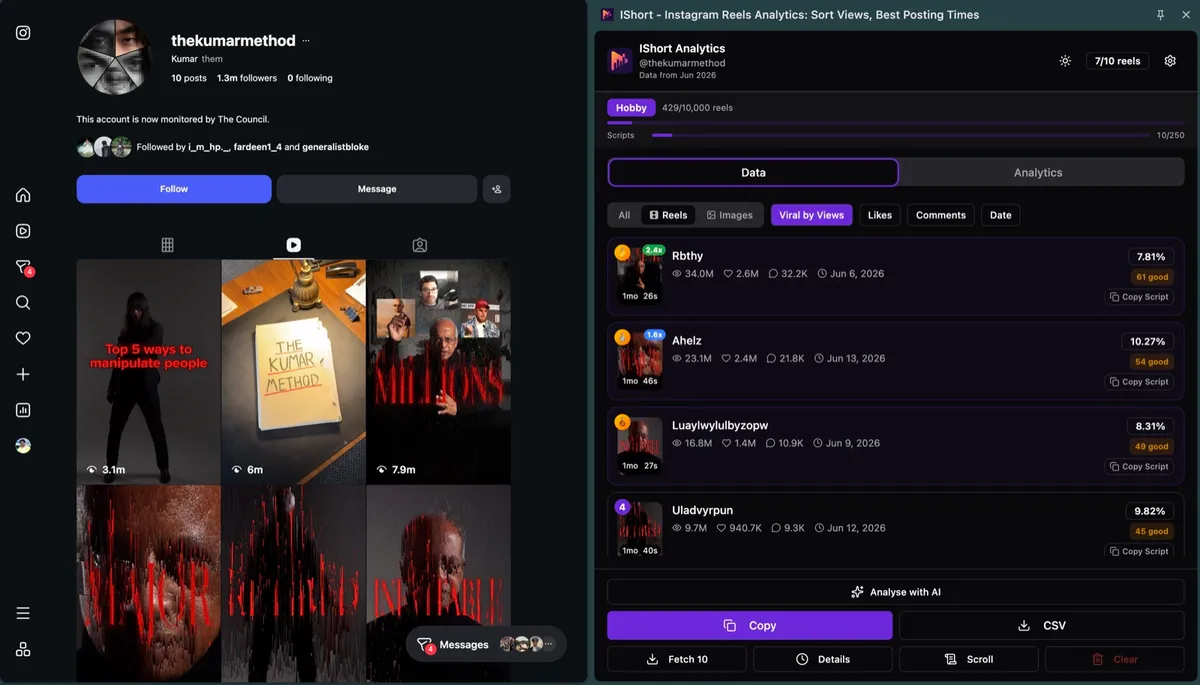
That unlocks the research native Insights cannot: find your own true top performers, or analyze any competitor's reels to see which of their posts actually popped and why. When you are ready to act on it, our guide to getting more views on Instagram Reels turns the patterns into a plan, and if you want views without any booster nonsense, start with free Instagram views the honest way.
See every reel's views, ranked - free
Install IShort and sort any public profile's reels by real views, with a 0 to 100 Viral Score on every post. No login, no cost.
Add to Chrome - Free Add to Edge - FreeFrequently Asked Questions
How do I see views on my Instagram reels?
Open your reel and the view count shows on it. On a professional Creator or Business account, tap View insights below your own reel to see plays, reach, watch time, and interactions. The Professional Dashboard rolls these up across your recent posts so you can see the trend.
Can I see how many views someone else's reel got?
Yes. Instagram shows a public view count on every reel, so you can open any public creator's profile and see the views on each reel without following them. To rank a whole profile by views instead of checking one at a time, the free IShort extension sorts every reel by real views for you.
Does Instagram show view history over time?
Only within a limited window. Native Insights and the Professional Dashboard keep recent performance, but they do not hold a long month-over-month history or let you export it. To track trends over time you need a separate analytics tool.
Do you need a business account to see Instagram views?
You can see the public view count on any reel with any account. For the deeper Insights - reach, watch time, and interactions on your own posts - you need a free professional Creator or Business account. Switching is free and takes a minute in settings.
What is the best free Instagram views checker?
For sorting a whole profile by views, the free IShort Chrome and Edge extension lists every reel on any public profile with its real view count and a 0 to 100 Viral Score, with no login. It works on your own account and on any public creator you want to study.
Final thoughts
Seeing your Instagram views is easy; making sense of them is where native tools run out. The public view count and your Insights tell you how a single post did, but growth comes from patterns - which hooks, times, and formats drive your best reels, and how you stack up against the accounts you admire. Use IShort to rank real views across any public profile, learn what the winners have in common, and pour that into your next reel. Measure honestly, and let real views guide the work.