
Ask Claude about your Instagram research
Connect Claude to your IShort scripts, competitor reports and link in bio. Free, no code.
Works withClaudeChatGPT BetaCursor
 Claude
 ChatGPT
  Cursor
Your Instagram password and login are never shared, with IShort or with Claude.
Updated
From Instagram research to Claude in 2 minutes
Research, transcribe, connect, ask.
-
Open Connectors
In claude.ai, go to Customize → Connectors and click “Add custom connector”.
Open claude.ai connectors -
Paste the URL
Name it IShort, paste the server URL and click Add.
https://ishort.pro/mcp -
Sign in
Click Connect, sign in with the Google account you use for IShort, and press Allow.
-
Ask
In any chat, turn IShort on from the + menu under Connectors, then just ask.
Menu names checked on Anthropic’s help pages on 25 Oct 2026.
Set up the Instagram MCP server in your app
claude.ai is the quickest.
claude.ai Recommended
About 60 seconds and no API key: you sign in with Google. Follow the 4 steps under the video.
Open claude.ai connectorsServer URL
https://ishort.pro/mcpWhich Claude plans?
Custom connectors work on every Claude plan: Free, Pro, Max, Team and Enterprise. Free allows one. On Team and Enterprise, an Owner adds IShort first, then each member connects.
Source: Anthropic, checked 25 Oct 2026.
Claude Desktop
Connectors carry over from claude.ai, so there’s nothing to install.
- Add IShort on claude.ai (see the claude.ai steps).
- Open Claude Desktop signed in with the same account.
- Turn IShort on from the + menu under Connectors in any chat.
Claude Code
Run one command in your terminal, with your IShort API key in place of YOUR_KEY.
claude mcp add --transport http ishort https://ishort.pro/mcp --header "Authorization: Bearer YOUR_KEY"Cursor & others
Add this to ~/.cursor/mcp.json, or to any app that takes a JSON server config. Replace YOUR_KEY with your API key.
{
  "mcpServers": {
    "ishort": {
      "type": "streamable-http",
      "url": "https://ishort.pro/mcp",
      "headers": {
        "Authorization": "Bearer YOUR_KEY"
      }
    }
  }
}
ChatGPT Beta
Beta. We’re still testing the full ChatGPT flow. claude.ai is the recommended option today.
OpenAI lists custom MCP servers for ChatGPT Business, Enterprise and Edu on the web. On Business, only admins and owners can add one.
- In ChatGPT on the web, open Plugins, click the plus button and choose “Add custom MCP server”.
- Name it IShort and enter the server URL under Connection.
https://ishort.pro/mcp - Set up sign-in, tick “I understand and want to continue”, then click “Create as a plugin”.
- In a chat, select IShort for your message and ask.
Steps from OpenAI’s help center, checked 25 Oct 2026.
Need an API key?
Claude Code, Cursor and scripts use one. In your IShort dashboard (free Google sign-in), open Settings → API Keys and click Create key. Keys start with ishort_sk_ and are shown once; keep up to 5 and revoke any.
Ask in plain words
Claude picks the right IShort tool for you.
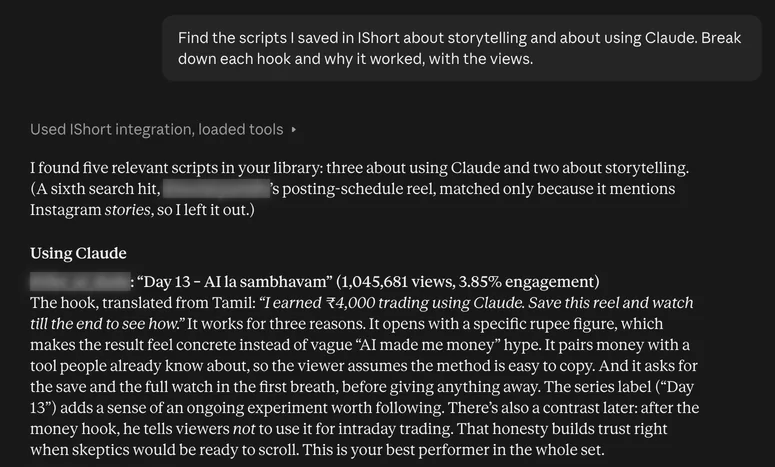
Try these prompts
Break down your saved hooks
“Find the scripts I saved in IShort about storytelling. Break down each hook and why it worked, with the views.”
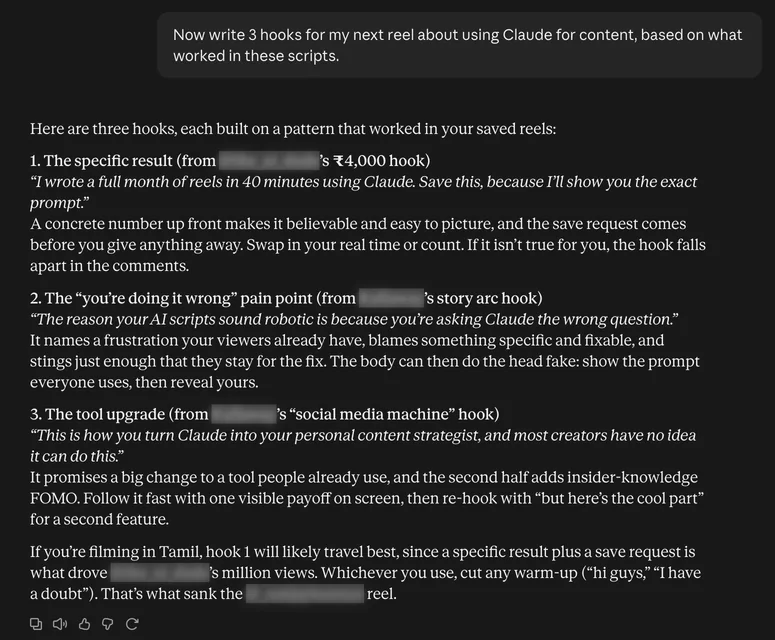
search_my_scriptsWrite your next hooks
“Now write 3 hooks for my next reel, based on what worked in these scripts.”
search_my_scriptsCompare with a competitor
“What is @yourcompetitor doing in their top reels that I'm not? Use my IShort competitor report and my own scripts to compare us.”
get_competitor_report + list_my_scriptsUpdate your link in bio
“Add my new video to my link in bio and tell me which link got the most clicks this week.”
update_bio_page + get_bio_analyticsMore ideas: Claude for Instagram · Claude prompts for Instagram
What Claude can do with IShort
Research
2 tools
- Transcribe any reelPaste an Instagram URL, get the full script. Cached reels come back instantly and free.
transcribe_reel - Pull a reel’s numbersViews, likes, comments, duration and caption for any public reel.
get_reel_details
Scripts
2 tools
- Browse your script libraryEverything you’ve transcribed, with views and engagement. Filter by account.
list_my_scripts - Search your scriptsFind every saved script that mentions a topic, hook or phrase.
search_my_scripts
Account breakdowns
2 tools
- List your breakdownsYour saved competitor reports, newest first.
list_my_competitor_reports - Open a breakdownThe full report for a handle: posting pace, averages and outliers.
get_competitor_report
Link in Bio
3 tools
- Read your bio pageYour current links, socials and copy at ishort.pro/yourname.
get_my_bio_page - Update your bio pageLet Claude add a link or rewrite your bio copy.
update_bio_page - Check bio analyticsViews, clicks and CTR for your public page.
get_bio_analytics
Account & help
3 tools
- Check your quotaPlan, transcriptions left and lifetime research counts.
get_my_usage - Explain IShortWhat IShort does (no sign-in needed).
get_product_overview - Find a guideSearch IShort’s how-to guides (no sign-in needed).
find_guide
Where the data comes from
The free extension
- Transcribe reels in the extension
- They land in your IShort library
- Claude reads them on request
Your script library also grows when Claude transcribes through the MCP. Competitor reports are saved from IShort.
Install the free extensionIs it safe for my Instagram account?
It reads your research. It never touches your Instagram.
Your Instagram login is never shared
IShort never asks for your Instagram password or session cookie, and Claude never sees them. You sign in to IShort with Google.
Read-only on Instagram
IShort never posts, likes, follows or messages. The one write tool, update_bio_page, edits your own IShort bio page.
Runs on IShort’s servers
Your browser, the extension and Instagram can all be closed while you ask.
Disconnect any time
Remove IShort from Claude’s connectors, or revoke an API key in Settings → API Keys.
What Claude can read, and nothing else:
- Your scripts
- Your competitor reports
- Your bio page and its analytics
- Your usage
- Public details for reel URLs you paste
Tool answers never push upgrades.
Free on every plan
Only new transcriptions use your allowance.
Free
10
AI transcripts, one-time
Hobby
250
AI transcripts a month
Creator
1,000
AI transcripts a month
Already transcribed
Free
Reels someone already transcribed come back instantly
Rate limits per hour: transcribe 10 · link-in-bio edits 20 · everything else 60
Instagram MCP FAQ
Do I have to share my Instagram password or login?
No. IShort never asks for your Instagram password or session cookie, and Claude never sees them. Claude signs in to your IShort account with Google. Some Instagram MCP servers ask for your password or a session cookie; IShort needs neither, because it works from your own IShort research and public reel links.
What is an MCP server?
MCP (Model Context Protocol) is an open standard that lets an AI assistant use other apps for you. IShort’s MCP server lives at https://ishort.pro/mcp and gives Claude or ChatGPT 12 tools over your own IShort research.
Is IShort MCP free?
Yes, on every IShort plan, including Free. New transcriptions use your AI transcript allowance (Free 10 one-time, Hobby 250 a month, Creator 1,000 a month); reels someone already transcribed are free. Custom connectors work on every Claude plan, and Claude Free allows one.
Do I need an API key?
Not for claude.ai or Claude Desktop: you sign in with Google. Claude Code, Cursor and scripts need a key from Settings → API Keys in your IShort dashboard.
Does it work with ChatGPT?
In beta. OpenAI lists custom MCP servers for ChatGPT Business, Enterprise and Edu on the web. IShort has a ChatGPT sign-in path, but we’re still testing the full flow, so claude.ai is recommended today.
Does my browser need to stay open?
No. IShort MCP runs on IShort’s servers, so your browser, the extension and Instagram can all be closed. Reel lookups happen server-side too: in our 24 Oct 2026 check, 3 of 3 public reels resolved.
Can it post to Instagram or use my account?
No. IShort MCP never logs in to Instagram as you, so it can’t post, like, follow or message, and nothing runs on your account. Reel lookups use the reel’s public page from IShort’s servers. The only thing it can change is your own IShort link-in-bio page.
What can Claude read?
Only your IShort data: the scripts you transcribed, your competitor reports, your bio page and its analytics, your usage, and public details for reel URLs you paste.
How do I disconnect?
Remove IShort under Customize → Connectors in Claude. For Claude Code or Cursor, revoke the key in Settings → API Keys in your IShort dashboard.
Does it work with Cursor or Claude Code?
Yes. Claude Code adds IShort with one command, and Cursor uses a short JSON config in ~/.cursor/mcp.json. Both need an IShort API key.
Ask Claude about your next reel
Free on every plan. About a minute to connect on claude.ai.
370,000+ reels analyzed on IShort (Oct 2026) · REST API for developers