

Quick answer: Managing an Instagram account is a five-stage loop - plan, create, schedule/post, engage, and measure - that you repeat every week and month. No single tool covers all five, so most creators pair a scheduler with an analytics tool. IShort handles the measurement half (Viral Score, posting-time heatmap, hashtag analytics, competitor research, and a free link-in-bio), but to be clear: it does not schedule or auto-post - you pair it with a scheduler for that.
The Instagram management loop
Growth on Instagram comes from a system you run on repeat, not from posting whenever inspiration strikes. Buffer's guide to growing on Instagram makes the same point: consistency plus feedback beats intensity. The loop has five stages, and the magic is in stage five feeding back into stage one.
| Stage | What you do |
|---|---|
| 1. Plan | Define content pillars and a rough calendar. |
| 2. Create | Batch-produce Reels, posts, and covers. |
| 3. Schedule / post | Queue content to publish at your best times. |
| 4. Engage | Reply to comments and DMs, and interact in your niche. |
| 5. Measure | Review what worked and feed it back into planning. |
Step 1: Plan your content pillars
Pillars are the three to five recurring themes your account is known for. They keep your calendar from becoming a scramble and make you recognizable.
- Pick 3 to 5 pillars. For a fitness coach that might be workouts, nutrition, mindset, and client wins.
- Assign a rough mix. Decide how many posts per week come from each pillar.
- Keep a running idea bank. Capture hooks and ideas as they hit so you never start from a blank page.
Step 2: Create in batches
Batching is what keeps management sustainable. Instead of making one post a day from scratch, dedicate a focused block to film several Reels, write their captions, and design their covers at once. You stay in one mode, your branding stays consistent, and you build a buffer so a busy week does not break your cadence.
Step 3: Schedule and post
Once content is made, queue it to publish at the times your audience is most active. This is the stage a dedicated scheduler owns - and it is worth being blunt here: IShort does not schedule or auto-post. For publishing, use a scheduling tool (Meta's own Business Suite works for basic needs, and there are many third-party schedulers). What IShort contributes is the when: its posting-time heatmap shows the windows your Reels actually performed best, so you can tell your scheduler the right times to hit.
Step 4: Engage daily
Instagram rewards accounts that spark conversation. Spend a short daily window replying to every comment and DM, responding to story reactions, and engaging genuinely with other accounts in your niche. Early engagement in a post's first hour is a strong signal, so being present right after you publish matters more than engaging at random.
Step 5: Measure and iterate
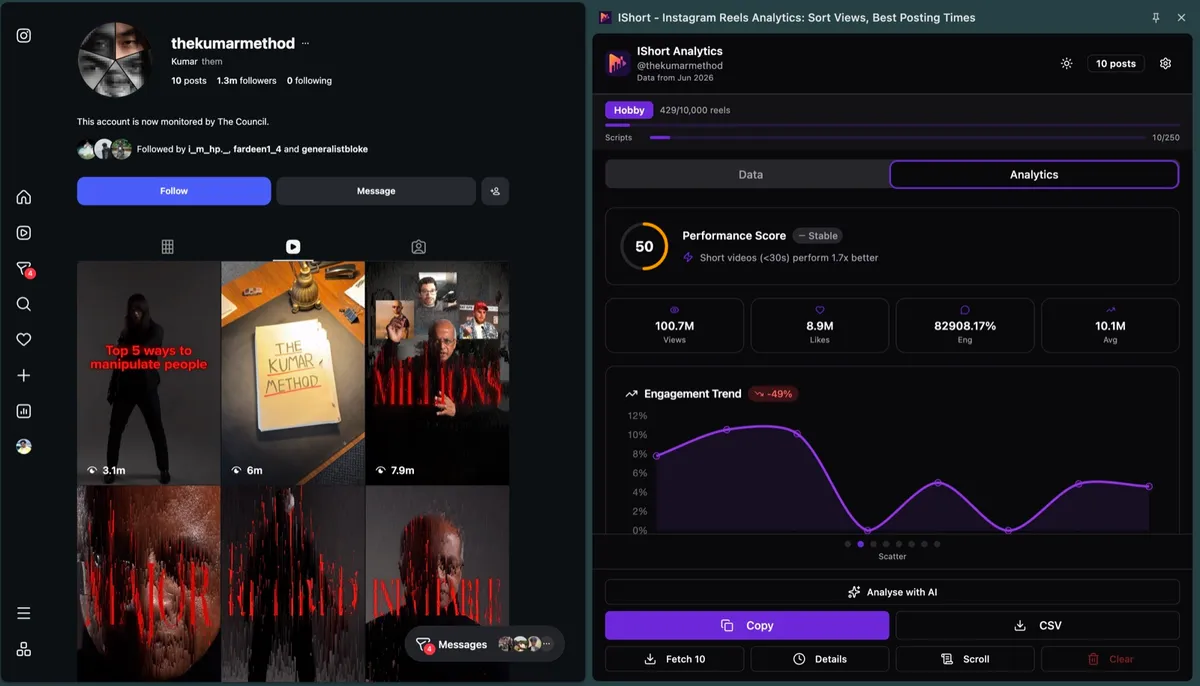
This is the stage most people skip - and it is the one that makes the whole loop compound. Measuring tells you which pillars, hooks, and formats to do more of. This is the half IShort was built for:
Viral Score
Spot your outlier Reels - the ones that beat your own baseline - so you can reverse-engineer why they worked.
Posting-time heatmap
See the hours and days your Reels actually performed best, then feed those windows to your scheduler.
Hashtag analytics
Learn which hashtags sit on your best-performing posts instead of guessing at tags.
Competitor research
Open any public profile and read its top Reels, audio, and engagement to benchmark your niche.
Who does what: build your stack
Because no tool covers the whole loop, the practical answer is a small stack. Here is an honest mapping:
| Job | Tool type | Does IShort do it? |
|---|---|---|
| Design covers and graphics | Design tool | Partly - it can set reel covers |
| Schedule and auto-post | Scheduler | No |
| Measure performance | Analytics tool | Yes |
| Research competitors | Analytics tool | Yes |
| Link hub in bio | Link-in-bio tool | Yes (free) |
Pair IShort's Reels analytics dashboard and competitor analysis with a scheduler of your choice, and you have covered the full loop.
Own the measurement half of your workflow
IShort is a free analytics extension - it does not schedule posts, and it does not pretend to. It covers what a scheduler cannot: Viral Score, posting-time heatmaps, hashtag analytics, and competitor research. Pair it with your scheduler and close the loop.
Add to Chrome - Free Add to Edge - FreeFinal thoughts
Managing an Instagram account well is less about hustle and more about running a tight loop: plan pillars, create in batches, schedule at your best times, engage daily, and measure so the next round is smarter than the last. No single tool does all of it, and any tool that claims to should make you skeptical. Pair a scheduler for publishing with IShort for measurement and competitor research, keep the loop turning, and let each cycle's data sharpen the next.
Frequently Asked Questions
What does managing an Instagram account involve?
Managing an Instagram account is a repeating loop of five stages: plan your content pillars, create posts and Reels in batches, schedule and publish them, engage with your community daily, and measure what worked so you can iterate. The accounts that grow treat it as an ongoing system, not a one-off burst of posting.
How much time does it take to manage an Instagram account?
It varies with your posting cadence, but batching is the key to keeping it manageable. Many creators spend a focused block each week planning and creating content, schedule it in advance, and then spend a short window most days on engagement and replies. Measuring monthly rather than obsessing daily also saves time.
What tools do I need to manage an Instagram account?
Most workflows combine a few tool types: a scheduler to plan and publish posts, a design tool for graphics and covers, and an analytics tool to measure performance and research competitors. No single tool does everything well, so pick the best one for each job rather than expecting one app to cover the whole loop.
How often should I check Instagram analytics?
A light weekly glance and a deeper monthly review work well for most accounts. Weekly, you spot which recent posts overperformed; monthly, you look at trends - your best posting times, top hashtags, and which content pillars drive the most reach - and adjust your next month's plan around what the data shows.
Does IShort schedule or post to Instagram?
No. IShort does not schedule or auto-post - it is an Instagram Reels analytics extension. It covers the measurement half of account management: a Viral Score for outlier content, a posting-time heatmap, hashtag analytics, competitor research, and a free link-in-bio. For scheduling and publishing, pair it with a dedicated scheduler.