

Quick answer: Open a top account in your niche, sort its reels by views (or read the Viral Score) to surface the real outliers, Copy Script on a winner to study the hook in one click, then export the whole library to CSV to find patterns — repeat across a few accounts and a full research pass takes minutes, not an afternoon.
Why content research eats so much time
Done by hand, competitor research is death by a thousand tabs. You scroll a profile's grid, eyeball which reels look like they did well, screenshot the ones that caught your eye, and retype captions or ideas into a notes doc. To study a hook you scrub the video and type it out line by line. And at the end you still don't have real numbers — just a folder of screenshots and a hunch, because Instagram's grid doesn't sort by views or show you engagement side by side.
The problem isn't effort, it's the manual loop. Every one of those steps — finding the winners, reading the script, pulling the metrics — can be a single click instead of a chore. That's the whole idea behind the workflow below.
The 5-minute research loop with IShort
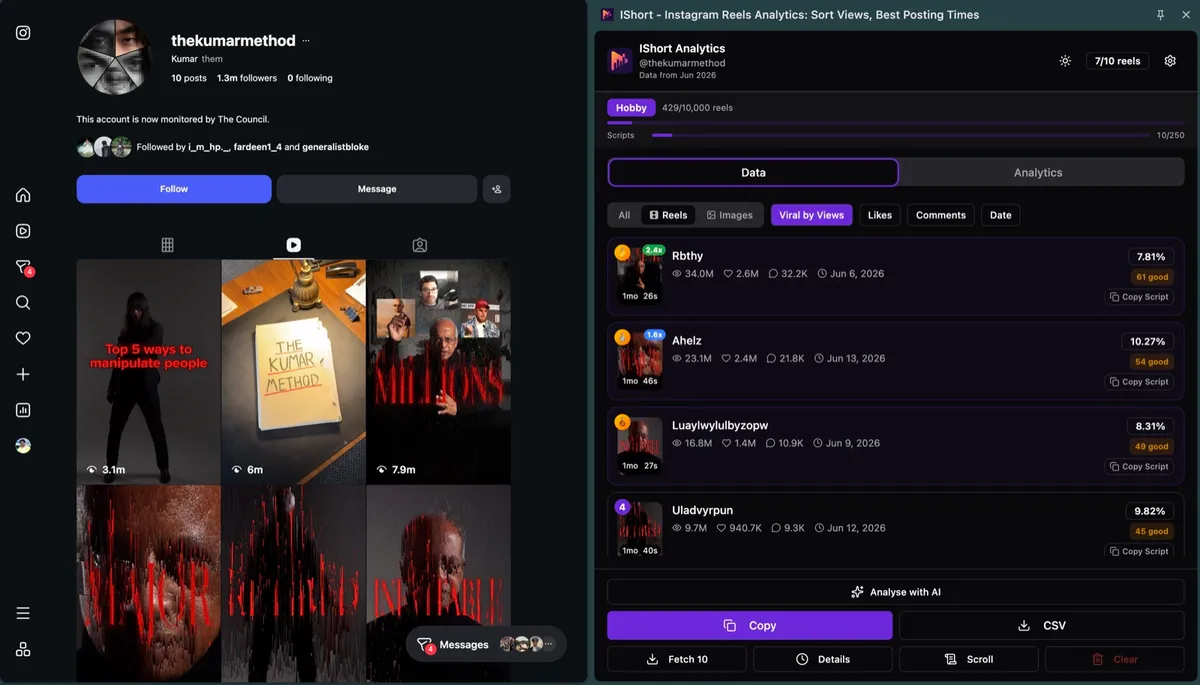
IShort is a free Chrome and Edge extension that reads public Instagram profiles right in your browser — no login, no API, no password. Here's the loop that replaces the afternoon of scrolling:
- Open a top account in your niche. Go to any public profile's reels and let IShort capture them as you scroll — it handles bulk, paginated capture, batches of 200 up to 1,000+ reels.
- Sort by views / read the Viral Score. One click puts the biggest hits at the top, and the Viral Score (0–100) flags true outliers instantly — no guessing from thumbnails.
- Open a winner and Copy Script. One click returns a server-side AI transcript (11 languages) so you can read the exact hook and structure instead of pausing and typing.
- Export the whole library to CSV. Pull every reel into one CSV — views, likes, comments, engagement %, duration, hashtags, music and more — so you can sort and spot patterns in a spreadsheet.
- Repeat across 3–5 accounts. Do the same for the other leaders in your space and you've got a data-backed picture of what actually works — in the time it used to take to research one profile.
What to actually research
Once the data is in front of you, look for the levers you can copy. A few worth pulling on:
- Hooks. Read the first line of the top reels' transcripts — the pattern in how winners open is usually the single most repeatable takeaway.
- Audio. Note the original-vs-trending mix on the biggest hits, and which specific sounds recur.
- Hashtags. See which tags the top performers lean on versus the ones that go nowhere.
- Posting time. Cross-reference when the outliers went up — then plan your own calendar around your best time to post Reels.
- Format & length. Check the duration of the winners so you match the format your niche actually rewards.
The one-click time-savers
Each of these collapses a manual chore into a single action — that's where the hours go:
One-click CSV export
Pull every reel's numbers at once (11-14 columns), instead of copy-pasting numbers one post at a time into a spreadsheet.
One-click transcript
Copy Script returns a server-side AI transcript in seconds (11 languages), instead of pausing the video and typing the hook out.
Sort by views
The biggest reels jump to the top of the list, instead of scrolling a grid and guessing which thumbnails did well.
Bulk capture
Grab a whole library in one pass — batches of 200 up to 1,000+ reels — instead of scanning post by post.
Manual vs IShort
Rough, illustrative comparison of the same four research tasks — the point is the shape of the time saved, not a stopwatch reading:
| Task | The manual way | With IShort |
|---|---|---|
| Find a profile's top reels | An afternoon of scrolling the grid, eyeballing thumbnails | Sort by views — winners at the top in one click |
| Get a reel's script | Pause-and-type, roughly 20+ minutes a reel | Copy Script — a server-side transcript in seconds |
| Pull the metrics | Screenshot and retype numbers post by post | Export every reel to CSV (11-14 columns) |
| Compare several accounts | Repeat the whole slog for each profile | Run the same loop per account, then diff the CSVs |
Cut your Instagram research to minutes
Install IShort free and turn any public profile into sortable data — top reels by views, one-click scripts, and a full CSV export. No login, no cost.
Add to Chrome — Free Add to Edge — FreeFrequently Asked Questions
How do I do Instagram content research fast?
Stop researching one reel at a time. Open a top account in your niche, let IShort capture its reels, then sort the whole library by views to see the real outliers instantly. Open a winner and use Copy Script for a one-click transcript of the hook, then export every reel to CSV — 11-14 columns each — to spot patterns across the account. Repeat across three to five accounts and you have a research doc in minutes instead of an afternoon.
What's the fastest way to see a competitor's best reels?
Open any public Instagram profile with the free IShort Chrome extension, let it capture the reels, and sort by views or read the Viral Score (0 to 100). The biggest hits and outliers jump to the top of the list immediately — no scrolling the grid guessing which posts did well, because the real view counts and engagement sit in the table.
How do I get the script/transcript of a reel quickly?
Open the reel in IShort and click Copy Script. It returns a one-click AI transcript generated server-side in about a dozen seconds, in 11 languages — so you can study the exact hook and structure without pausing the video and typing it out line by line.
Do I need an Instagram login or API?
No. IShort is a Chrome and Edge extension that reads public Instagram profiles right in your browser. There is no Instagram login, no API key, and no password to hand over — you just open a profile and the data appears.
Is IShort free?
Yes, there is a free plan: a one-time allowance of 500 reels and 10 AI transcripts, unlimited downloads, and a free link-in-bio page. If you research heavily, Hobby is $10/mo (10,000 reels, 250 transcripts) and Creator is $29/mo (unlimited reels, 1,000 transcripts); downloads are unlimited on every plan.
Final thoughts
Research doesn't have to be an afternoon of screenshots and guesswork. When finding the winners, reading the hook, and pulling the metrics are each one click, the whole loop compresses into the gap between meetings — and you come out with real numbers instead of a hunch. Run the loop across the leaders in your niche, copy what the data says actually works, and spend the time you saved on making the reels.