

Quick answer: In 2026 Instagram limits you to 5 hashtags per post or Reel, and hashtags no longer boost reach on their own. So "finding viral hashtags" is no longer about collecting 30 tags — it's about finding the 5 highest-signal tags your niche's best Reels are already using. The fastest way: open the top Reels in your niche, read the exact hashtags on the outliers with the free IShort Chrome extension, and reuse the pattern.
Want ready-made tags? Copy a 5-tag hashtag pack for your niche. Want to see which tags got views? Use free Instagram hashtag analytics.
What changed: Instagram's 2026 hashtag rules
Before you hunt for hashtags, you need to know the new rules — because they completely change what a "good" hashtag strategy looks like.
- The 5-hashtag limit. Instagram announced it would "gradually update the number of hashtags that you can include in a caption for a reel or post to five." In its own words: "using fewer (up to 5) more targeted hashtags, rather than many generic ones, can improve both your content's performance and people's experience on Instagram." Some accounts were tested at just three during the rollout.
- You can no longer follow hashtags. Instagram removed hashtag following in December 2024, so posts from a followed tag no longer land in anyone's feed. Reaching people through hashtag followers is simply gone.
- Hashtags don't boost reach. Instagram head Adam Mosseri has said plainly that hashtags are "not a way to get more reach" — they help label what a post is about so it can be classified and surfaced in Search and Explore.
The takeaway is counter-intuitive: because you only get five slots and they no longer inflate reach, research matters more than ever. Each hashtag has to earn its place by being genuinely relevant and genuinely used by the content winning in your niche.
What "viral hashtags" actually means now
Forget the idea of a magic hashtag that floods you with views. In 2026 a "viral hashtag" is simply a tag that is (1) truly relevant to your content, (2) actively used by the Reels currently performing well in your niche, and (3) specific enough to classify you correctly so Instagram shows your Reel to the right audience. A tag with 40 million posts is not "better" — it's usually worse, because your Reel drowns instantly and Instagram can't tell what you're about. Trending and relevant beats big and generic every time.
How to find viral hashtags for Instagram (step by step)
The reliable method is to reverse-engineer the tags already working in your niche, rather than guess from a generic list. Here's the exact workflow:
- Find the winning Reels in your niche. Search a seed hashtag or topic, open the Reels tab of 3–5 competitors, or scroll Explore. You're looking for the Reels that clearly out-performed the account's norm.
- Read the exact hashtags on those Reels. Install the free IShort Chrome extension, open a creator's Reels page, and it captures every Reel's hashtags along with its views, likes, comments, and audio.
- Sort by views to isolate the outliers. In IShort, sort the account's catalog by views. Ignore the average posts — look only at the true breakouts, and note which hashtags recur across several of them. Those repeated tags are your candidates.
- Sanity-check each tag in Instagram search. Tap a candidate hashtag in the app to see its post count and the related tags Instagram suggests. Favour specific tags in the tens-of-thousands to low-millions range over mega-tags.
- Assemble your five and track them. Build your set (see below), then watch which combinations line up with more reach on your own Reels using IShort's hashtag analytics. Keep what correlates with reach; drop what doesn't.
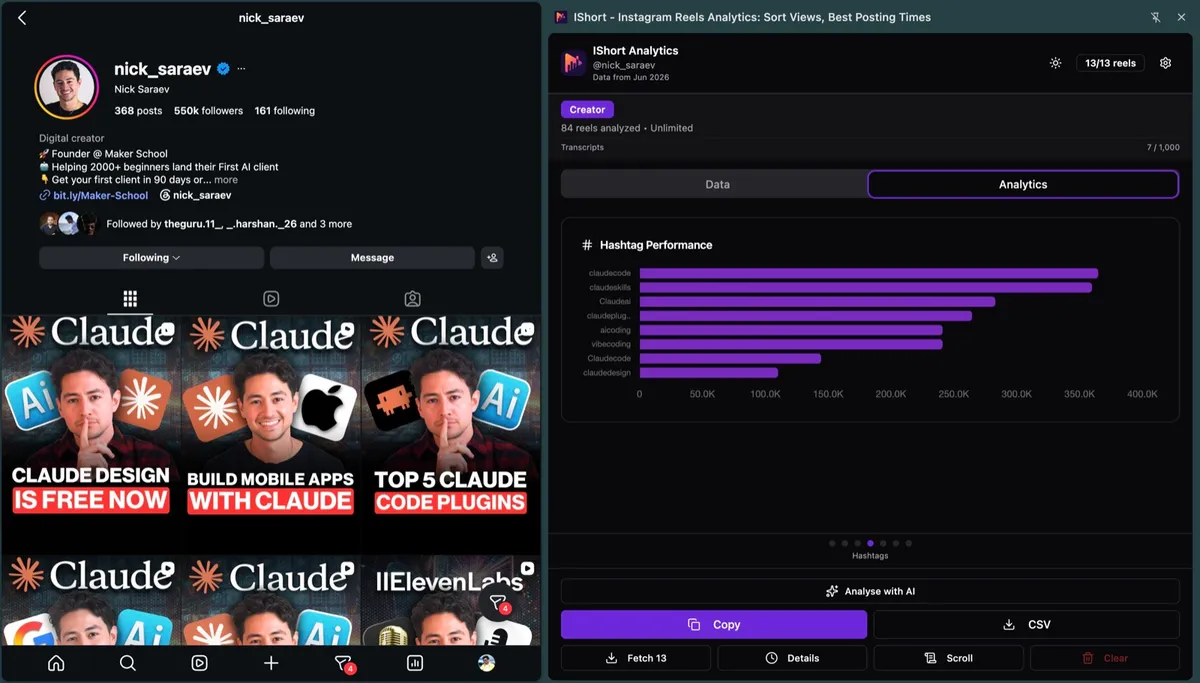
This is the whole edge: instead of trusting a static "best hashtags" list, you're copying the live, proven tags from the exact Reels beating you in your niche.
How to pick your 5 hashtags (the mix)
With only five slots, use a spread rather than five near-identical tags:
- 1 broad category tag — defines your lane (e.g. #skincare, #homecooking).
- 2 niche tags — your specific sub-topic, where you can realistically be seen (e.g. #retinolroutine, #30minutedinners).
- 1 micro / community tag — small but highly engaged, often a community or format tag.
- 1 branded or campaign tag — your own, so your content and community stay connected.
For a deeper split by niche, see our guides to the best hashtags for Instagram Reels and how many hashtags you should use.
Mistakes that waste your five slots
- Trying to use more than five. Extra tags no longer help and can be disregarded — you're just adding clutter.
- Copy-pasting the same block on every post. It reads as spammy and can mis-classify content that isn't actually about those tags. Match tags to each specific Reel.
- Chasing mega-volume tags. #love, #viral, #fyp, #instagood — too broad to rank in and too vague to classify you.
- Using banned or "broken" hashtags. Some tags are restricted and can suppress the whole post. If a tag's page shows no recent top posts, avoid it.
Find your niche's real hashtags in 5 minutes. Install the free IShort Chrome extension, open any competitor's Reels tab, sort by views, and read the exact hashtags on their biggest Reels. Then track which of your own 5-tag sets actually move reach with IShort hashtag analytics — no login or business account required.
Why this beats a generic hashtag list
Every "top 100 hashtags" article shows you the same saturated tags everyone else is already using — and with only five slots, you can't afford saturated. By pulling the hashtags off the specific Reels winning in your niche right now, you get tags that are proven, current, and correctly scoped to your audience. Pair that with a strong hook and the fundamentals in our get-more-views guide and the 2026 Reels algorithm breakdown, and your five hashtags are doing exactly the one job they still have: getting your Reel classified and surfaced to the right people.