
How to add a link to your Instagram bio (2026 app steps)
Use the Instagram app on your phone. These are the steps in Instagram's Help Center, checked in October 2026.
- Tap your profile picture in the bottom right to open your profile.
- Tap Edit profile.
- Tap Links. Older app versions show a Website field here instead.
- Tap Add external link. Instagram's Help Center calls this button Add link.
- Paste the full URL, starting with https://, and add a short Title (optional), such as "Shop my presets".
- Tap Done. The link now shows under your bio, and anyone can tap it.
To delete a link, go to Edit profile → Links, tap the link, then tap Remove link.
How to add up to 5 links and change their order
Repeat the steps to add more links. Instagram has allowed up to 5 links per profile since April 2023. With two or more, your profile shows the first link plus a count of the others, and a tap opens the full list.
So put the link you most want tapped first. To reorder: Edit profile → Links → Options → Reorder links, then hold a link, drag it up or down, and tap Accept.
| Where you put a link | Clickable? | Who can use it |
|---|---|---|
| Edit profile → Links | Yes, up to 5 | Every account, free |
| Typed into your bio text | No, plain text | - |
| Captions and comments | No, plain text | - |
| Link on a post or reel | Yes, 4-12 a month | Meta One Advanced and up (from $49.99/mo) |
| Link page, up to 20 links | Yes | Meta One Essential and up (from $14.99/mo) |
Can you add a link to your Instagram bio on a computer?
No. Instagram's Help Center says adding website links "isn't available on computers", and the Edit profile page on instagram.com tells you links can only be edited on mobile. Your options:
- Use the app on a phone or tablet (iPhone or Android). It takes a minute.
- Set your first link to a link-in-bio page once. After that, you change your links from any browser: an ishort.pro page is edited on the web, so a laptop works.
- Desktop visitors are fine. Instagram says anyone, on or off Instagram, can see your websites, so people on computers can still click them.
Why is my Instagram bio link not showing or not working?
Most broken bio links come down to one of these five causes.
| Problem | Likely cause | Fix |
|---|---|---|
| Link shows as plain text | The URL was typed into the Bio box or a caption | Add it in Edit profile → Links |
| No Links option, or the steps don't match | An old app version | Update Instagram from the App Store or Google Play |
| You can't add or edit links | You're on instagram.com | Use the app on your phone |
| "Link not allowed", or it won't save | Instagram flagged the URL or domain | Use the full https:// address of the real page, with no redirect chain |
| Only one link is visible | Extra links sit behind a tap | Move your key link to the top |
Why links get flagged: Meta's spam rules ban links that redirect people to a different domain, look-alike domains that impersonate brands, and other deceptive URLs. Caption links have their own page: Instagram clickable caption links.
Create your free link in bio
Claim your ishort.pro/you page in under a minute - free, with click analytics built in.
Get your free page →How to share more than 5 links (free, with click analytics)
Five slots fill up fast, and only the first one shows up front. Instagram's own answer is a paid Meta One link page with up to 20 links. The free answer is a link-in-bio page: one URL in your first slot that opens a page with all your links as buttons. That is what "link in bio" means for most creators.
IShort's link in bio is free at ishort.pro/yourname. Here is the full flow:
- Go to the IShort dashboard and sign in with a free Google account.
- Claim your username - your public page lives at ishort.pro/yourname (3-24 characters, lowercase letters, numbers, or underscores).
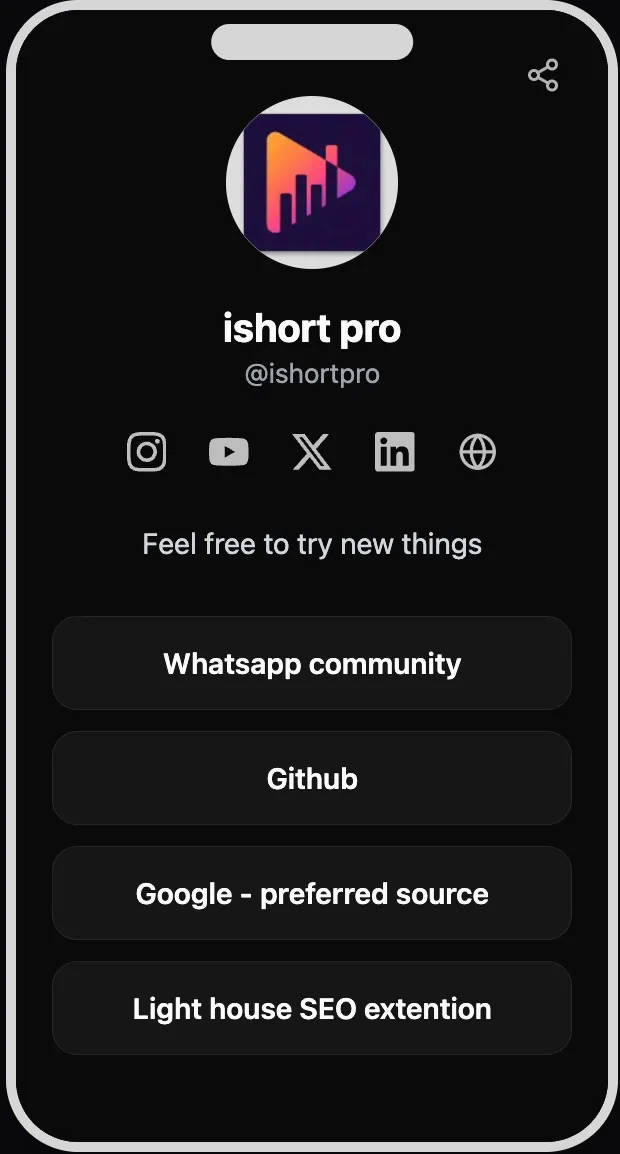
- Add your links (up to 20), each with a title and URL. Drag to reorder them, and add your Instagram, YouTube, X, LinkedIn, and website as social icons.
- Pick a theme - five presets or a custom color scheme - then set your display name, bio, and avatar.
- Copy your ishort.pro/you URL and add it as the first link in Edit profile → Links (see the steps above).
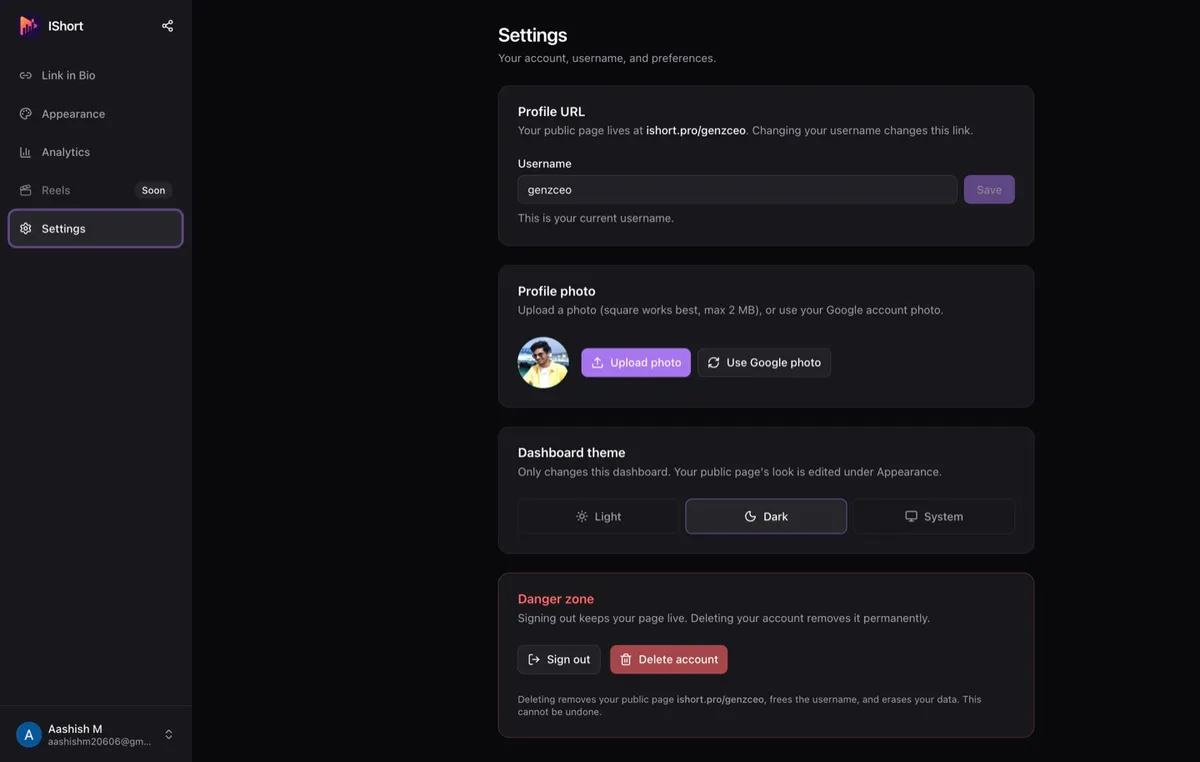
Because it is one stable URL, you never have to edit your Instagram bio again - just update your links inside the page, from your phone or a computer, and changes appear to visitors within about a minute. The page works right inside the Instagram in-app browser, and it adapts to each visitor's light or dark mode. For more on this setup, see our guide to a link in bio for Instagram.
One more benefit: you can see which links your Instagram audience actually taps. IShort's free analytics show page views, link clicks, and click-rate over 7, 30, or 90 days, plus a per-link breakdown, traffic sources and countries (see link in bio with analytics). These are aggregate counts only: you never see who visited, and only you can view your own stats. Not sure what to put on the page? Start with these link in bio ideas.
FAQ
How many links can you have in your Instagram bio?
Up to 5, for free, on any account. You add them in the app under Edit profile → Links. With a paid Meta One plan (Essential and up), your links become a link page with up to 20 links. A free link-in-bio page such as ishort.pro/yourname also fits up to 20 links into one slot.
Can you add a link to your Instagram bio on a computer?
No. Instagram's Help Center says adding website links isn't available on computers, and instagram.com tells you links can only be edited on mobile. Use the Instagram app on a phone or tablet. People on computers can still see and click your links.
Why is my Instagram bio link not clickable?
Usually because the URL was typed into the Bio text box or a caption, where it stays plain text. Add it through Edit profile → Links → Add external link instead. If it won't save, update the app and use the full https:// address of the real page, without redirects.
Do links in Instagram captions work?
Not for most accounts: a URL in a caption or comment shows as plain text. Since Meta One launched in September 2026, eligible public accounts on the Advanced plan and higher can add a clickable link to a set number of posts and reels each month (4 of each on Advanced). For everyone else, the bio link is the way.
Is a link-in-bio page free?
IShort Link in Bio is 100% free. You claim a page at ishort.pro/yourname, add up to 20 links plus social icons, pick a theme, and get click analytics on every link, with no paid plan or fees. You sign in once with a free Google account to manage your page.
Sources
- Instagram Help Center: Add a website to your Instagram profile - up to 5 links, app steps, reorder, not available on computers (checked Oct 22, 2026).
- Meta Help Center: Add a link page to your Instagram bio with Meta One - 5 links without a subscription, up to 20 with Meta One Essential and up.
- Meta Help Center: Add links to your posts and reels with Meta One - 4, 8 or 12 posts and reels a month on Advanced, Expert and Max.
- Meta Newsroom: Introducing Meta One - Sep 15, 2026, plan prices.
- Social Media Today: Instagram adds up to 5 links in your profile bio - Apr 18, 2023.
- Meta Transparency Center: Spam policy - deceptive redirects and look-alike domains.