
Just want to know what Linktree charges for? See is Linktree free?
Linktree made the "one link for all your links" idea famous. But if you want to know which of those links your audience actually taps, Linktree puts per-link clicks and click-rate behind its paid Pro plan. IShort Link in Bio gives you a clean bio page and that click data for free.
Quick answer: IShort Link in Bio is a 100% free Linktree alternative. You get a page at ishort.pro/you with up to 20 links, social icons, custom themes, a QR code, and free per-link click analytics — the analytics Linktree charges for. Sign-in is a free Google sign-in; there is no plan gating and no fee on your links.
Create your free link in bio
Claim your ishort.pro/you page in under a minute — free, with click analytics built in.
Get your free page →The difference: click analytics, free
The reason people go looking for a Linktree alternative is almost always the same — they want to see what's working. On Linktree's free tier you can see total views, but the moment you ask "which link do people actually click?" or "what's my click-rate?", you hit the Pro paywall.
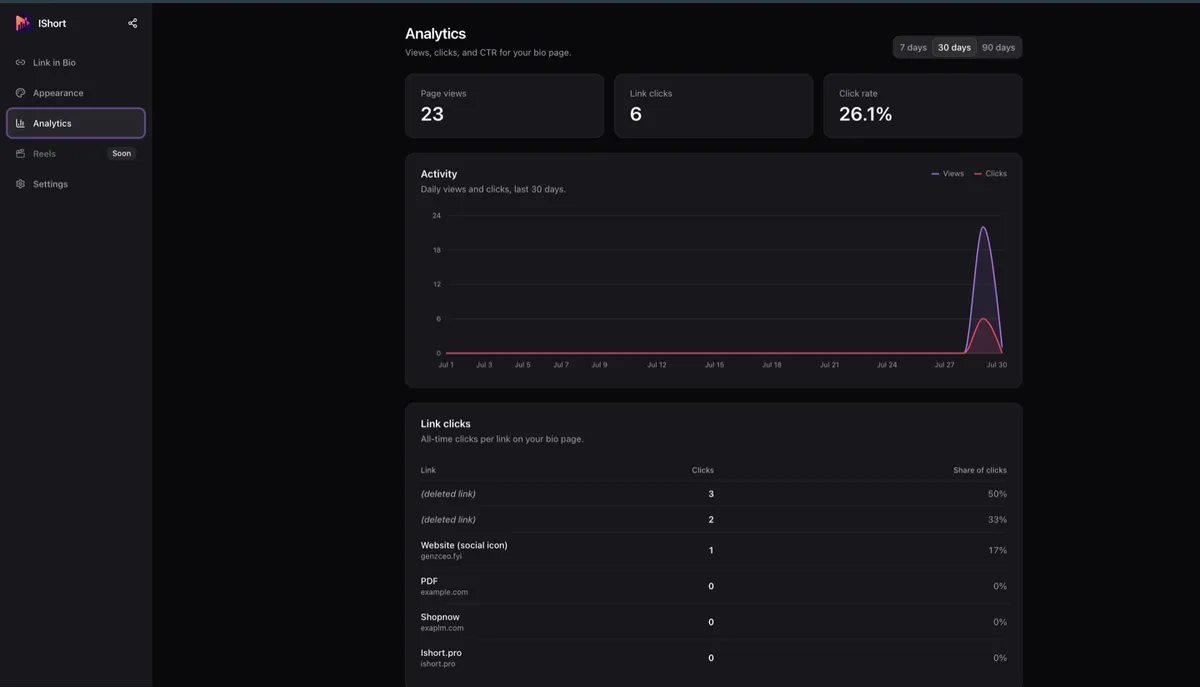
IShort includes that data for everyone. Your dashboard shows page views, total link clicks, click-rate (CTR), and a per-link and per-social-icon click table, with 7, 30, and 90-day ranges and deltas so you can see trends. Bot and crawler traffic is filtered out, so the numbers reflect real people. These are aggregate counts — IShort does not track who visited or where they are from, so there are no visitor cookies or third-party trackers on your public page.
IShort vs Linktree: an honest comparison
Both tools do the core job well. Here's a fair look at where each one fits, focused on a link-in-bio page and its analytics.
| Feature | IShort Link in Bio | Linktree |
|---|---|---|
| Price | Free | Free tier; paid Pro plan |
| Per-link click analytics | Free | Pro only |
| Click-rate (CTR) | Free | Pro only |
| Social icons | 5 (IG, YouTube, X, LinkedIn, website) | Yes |
| Themes & custom colors | 5 presets + custom hex | Yes |
| QR code | Free PNG download | Yes |
| Fee on your links | None | None |
| Third-party integrations | No | Many |
| Store / sell products | No | Yes |
To be fair to Linktree: it has a large library of third-party integrations and a commerce/store side for selling products and taking payments — things IShort does not do. If a built-in storefront is what you need, Linktree (or a tool like Beacons) is the better fit. But if you want a clean, fast link page with the click analytics that usually cost extra, IShort is the free choice. For a full walkthrough of everything the tool includes, see the Link in Bio overview.
What your free page includes
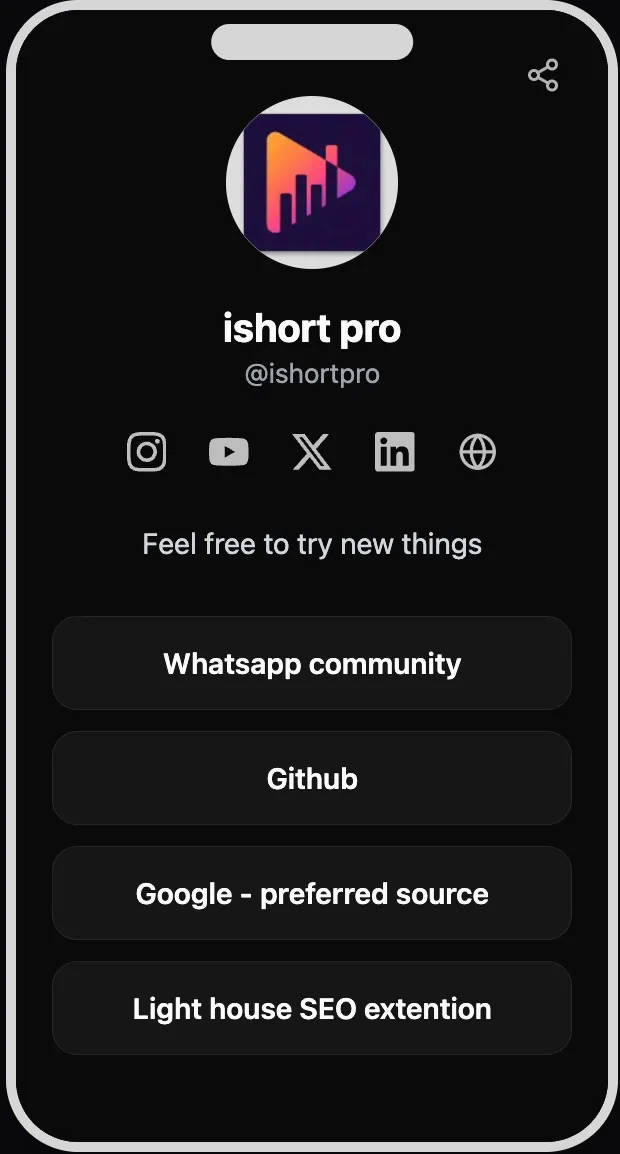
Your public page lives at ishort.pro/username (3–24 characters, lowercase letters, numbers, and underscores). You get up to 20 links with drag-and-drop reordering and forgiving URL input, plus 5 social icons — Instagram, YouTube, X, LinkedIn, and your personal website. Add a display name, a short bio, and an avatar (upload up to 2 MB or reuse your Google photo).
For the look, pick one of 5 theme presets — Classic, Midnight, Sunset, Forest, or Mono — or build a Custom theme with your own hex colors, button style (solid, outline, or soft), and shape (rounded, curved, or pill). The default look adapts to each visitor's light or dark mode. The page also works inside the Instagram and TikTok in-app browsers, so followers who tap your bio link never hit a broken experience — handy if you're building a link in bio for Instagram.
How to switch from Linktree
There's no automatic import, but moving over takes only a few minutes:
- Sign in with Google and claim your username at ishort.pro/you.
- Copy each link's title and URL from Linktree and paste them into the IShort editor, then drag to reorder.
- Add your social icons, pick a theme, and update the link in your Instagram, TikTok, or YouTube bio to your new ishort.pro URL.
Changes appear to visitors within about 60 seconds. If you're weighing other options too, our Beacons alternative guide covers the trade-offs when a creator storefront is on the table.
Ready to make the switch?
Claim your ishort.pro/you page in under a minute — free forever, with the click analytics Linktree charges for built right in.
Get your free page →FAQ
Is IShort really a free Linktree alternative?
Yes. IShort Link in Bio is 100% free with no plan gating. You get a public page at ishort.pro/username, up to 20 links, five social icons, five theme presets plus a custom theme, a QR code, and click analytics — all at no cost. Sign-in is a free Google sign-in.
Does it have click analytics like Linktree Pro?
Yes, and it is free. IShort shows page views, total link clicks, click-rate (CTR), and a per-link and per-social-icon click table with 7, 30, and 90-day ranges. Linktree keeps per-link click data and CTR behind its paid Pro tier.
Can I import my Linktree links into IShort?
There is no automatic import. You re-add your links manually, which takes only a few minutes. Copy each link title and URL from Linktree, paste them into the IShort editor, drag to reorder, and you are done.
Is there a fee to use IShort Link in Bio?
No. There is no subscription, no upsell, and no fee taken from your links. The link-in-bio tool is simply free. IShort also makes an Instagram Reels analytics Chrome extension, but that is a separate product and unrelated to the free bio page.
What will my link-in-bio URL look like?
Your page lives at ishort.pro/username. Usernames are 3 to 24 characters using lowercase letters, numbers, and underscores. You can paste that single URL into your Instagram, TikTok, YouTube, or X bio.
Does the IShort page work in the Instagram in-app browser?
Yes. The public page loads inside the Instagram and TikTok in-app browsers, and sign-in falls back to a redirect flow there so you can still edit your page. The public page uses no visitor cookies or third-party trackers.