
Quick answer: A “link in bio” is the single clickable link you're allowed to put in your social media profile. Because apps like Instagram and TikTok don't let you add links to individual posts, people use that one bio link — usually a mini page that holds all their links — to send followers wherever they want. You can make one free at ishort.pro in about two minutes.
If you've ever seen a caption end with “link in bio” and wondered what that actually means, you're in the right place. It's one of the most common phrases on social media, and the idea behind it is simple once you see it.
What “link in bio” actually means
Your bio is the short description at the top of your social media profile — your name, a line about who you are, and a spot for one website link. That one link is your “link in bio.” When a creator says “link in bio,” they're telling you: the thing I just mentioned is reachable through the link on my profile.
The catch is that most platforms only give you one clickable link there. So instead of wasting it on a single destination, most people point it at a small landing page that lists everything — their latest video, their shop, their other socials, a newsletter signup, and so on. That page is what people usually mean when they say “my link in bio.”
Why the link in bio exists
Instagram and TikTok are built to keep you inside the app. To do that, they don't make links in captions or comments clickable. You can type a URL into an Instagram caption, but people can't tap it — they'd have to copy and paste it by hand, which almost nobody does.
The one exception is your profile. The website field in your bio is tappable. That single tappable link became the main way creators and businesses move people from a post to somewhere they can actually take action — buy something, watch the full video, or subscribe. Hence the phrase, and hence why that one link is so valuable.
What people put on a link in bio
A good link-in-bio page is a short, ordered list of the things you want people to do. Common items include:
- Latest content — your newest video, episode, blog post, or product drop.
- Your other social accounts — so an Instagram follower can also find you on YouTube, TikTok, or X.
- A shop or product link — pointing to wherever you already sell.
- A newsletter or signup — to build an audience you actually own.
- Whatever you're promoting right now — an event, a collab, or a free resource.
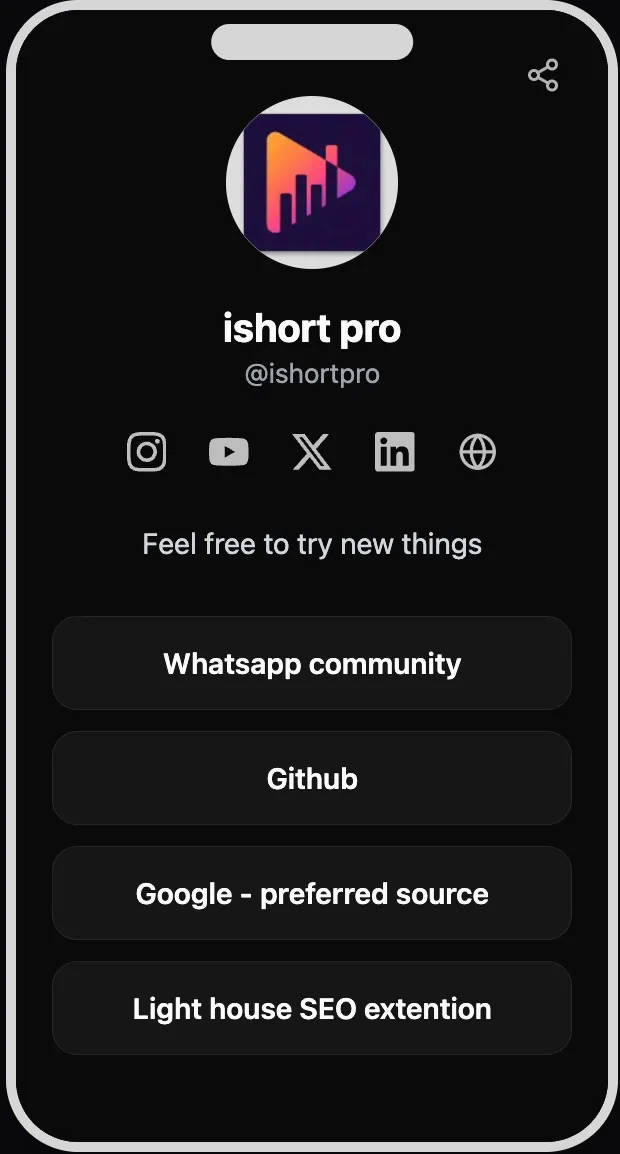
How a link in bio works
It's a simple chain. You create a page with a short, memorable URL — for example ishort.pro/yourname. You paste that one URL into the website field of every profile you have. Then, whenever you post, you tell people “link in bio.” They tap the link on your profile, land on your page, and pick whichever link they want. One link on your profile, many destinations behind it.
The better tools also count what happens next, so you can see which links people actually tap instead of guessing.
How to make a link in bio for free
You don't need a website or any money to get one. With IShort's free link-in-bio tool, it takes about two minutes:
- Sign in. Go to ishort.pro/dashboard and sign in with a free Google account.
- Claim your username. Pick a handle (3–24 characters) to get your page at ishort.pro/yourname. You can rename it anytime.
- Add your links. Add up to 20 links (with emoji and section headers), plus social icons for Instagram, YouTube, X, LinkedIn, and your website. Add a photo, your name, and a short bio.
- Make it yours. Choose one of five theme presets or custom colors, then copy your page link.
- Paste it in your bio. Put your ishort.pro/yourname URL in the website field on Instagram, TikTok, and anywhere else — and you're live.
Get your free link in bio
Claim ishort.pro/yourname in about two minutes — free, with click analytics built in.
Create your free page →Is a link in bio really free?
It can be. Plenty of tools offer a free tier, though many hide the useful parts — like analytics — behind a paid plan. IShort Link in Bio is 100% free: up to 20 links, five social icons, five theme presets plus custom colors, a downloadable QR code, email capture, and per-link click analytics (page views, clicks, click-rate, plus traffic sources and countries) — all without paying. It's server-rendered in about 15KB with no cookies or trackers, so your page loads fast and stays private.
To be clear about what it isn't: IShort is a links-and-analytics page, not a store or website builder. There's no built-in checkout, product catalog, or custom domain — you link out to wherever you already sell. If a clean, fast link page with real analytics is what you want, that's exactly what it does.
FAQ
What does “link in bio” mean?
It means the clickable link in someone's social media profile. Because Instagram and TikTok don't let you add tappable links to individual posts, “link in bio” tells followers to visit your profile and tap the one link there — which usually opens a page listing everything you want to share.
Why do people say “link in bio”?
Because it's the only reliable way to send people from a post to a real destination. Captions and comments aren't clickable on most platforms, so creators add “link in bio” to point followers to the tappable link on their profile.
Is a link in bio free?
Yes, it can be. Several tools have free tiers, but many keep analytics and customization behind a paid plan. IShort's link-in-bio tool is completely free, including per-link click analytics, themes, a QR code, and email capture, with only a free Google sign-in required.
How do I get a link in bio?
Create a page with a free tool, add your links, and paste that page's URL into the website field of your social profiles. With IShort you sign in at ishort.pro/dashboard, claim your username to get ishort.pro/yourname, add your links, and paste that link into your bio — about two minutes start to finish.