

Most creators are quietly burning their week filming three almost-identical videos for Reels, TikTok, and YouTube Shorts. The math is brutal. If every original idea takes three hours from script to upload, and you publish it on three platforms by re-recording it for each, you are spending nine hours per concept. Meanwhile, the creator next door spends four hours: one to make the Reel, one to repurpose it for TikTok, one for Shorts, and one to write a blog post or an X thread off the transcript. They publish on five surfaces. You publish on three. They win. This guide shows you their exact workflow, built around IShort's sort, export, and transcribe stack.
TL;DR — Only repurpose your top 20%
You do not have to repurpose everything. You have to repurpose the proven things. The fastest possible workflow is four steps:
- Sort your Reels by views and engagement using IShort's top-performing Reels view.
- Export the metadata of the top 20% to CSV so you have captions, hashtags, durations, and dimensions in one place — see our CSV export guide.
- Transcribe the audio with the built-in server-side transcription so you have the text version ready to recycle.
- Adapt the hook, caption, and hashtags per platform. Post.
The repurposing rule of thumb: if a Reel did not work on Instagram (under 50% of your channel median views), do not repurpose it. Repurposing a flop just produces three flops. Pick the winners, repackage only those.
Why repurpose at all? The math of cross-posting
You will hear two camps argue about whether repurposing "still works" in 2026. The answer is that it works as long as you respect what each platform's algorithm wants to see. Buffer's cross-platform analysis published in 2024 found that creators who systematically cross-post the same core video to Reels, TikTok, and Shorts gain roughly 2.4 times the total reach of creators who post only on Instagram, with marginal extra effort once a repurposing workflow exists (see Buffer's report at buffer.com/library/cross-posting-strategy).
The other reason to repurpose is risk diversification. Hootsuite's 2025 social trends survey reports that more than 40% of creators have had at least one platform account either shadow-banned, demonetized, or temporarily restricted in the past 12 months (blog.hootsuite.com/social-media-trends). If your business lives only on Instagram and Instagram has a bad week, your revenue has a bad week. Cross-posting builds redundancy.
The deeper benefit is audience asymmetry. A Reel that does 8,000 views on Instagram might do 90,000 on TikTok because TikTok's "For You" page is more aggressive about pushing your work to non-followers. Meanwhile YouTube Shorts has a much longer tail: a Short can keep pulling in views for six to twelve months because of YouTube's search and recommendation system. Posting the same video three times effectively lets you A/B test the same creative against three completely different distribution mechanisms.
The mistake most creators make: cross-posting blindly
Cross-posting fails when creators export a Reel with the TikTok or Instagram watermark still baked in, paste the same caption everywhere, and use Instagram hashtags on TikTok. All three platforms have explicitly said they down-rank uploads that look "off-platform". TikTok's creator help center warns that videos with visible competitor watermarks "may receive less recommendation in the For You feed" (tiktok.com/creators/creator-portal). YouTube's Shorts creation guidelines say the same thing: avoid "uploaded content from another platform" with the watermark intact (support.google.com/youtube/answer/12340300).
The fix is not "do not repurpose". The fix is to repurpose intentionally. Strip the watermark, rewrite the hook, swap the music, and translate the hashtags. The video stays the same. The packaging changes.
Platform-by-platform: where each algorithm differs
Before you repurpose anything, you need to know what each platform is optimizing for. They look similar from the outside — vertical 9:16, short, sound-on — but they reward completely different behaviors.
| Platform | What it rewards | What kills you |
|---|---|---|
| Instagram Reels | Sends, saves, and watch time. Reels gets pushed when people share it with friends in DMs. | Low completion. Visible TikTok watermark. Static thumbnails. |
| TikTok | Completion rate and rewatch rate. TikTok wants people to watch the whole thing, then loop. | Slow first second. Instagram watermark. "I-am-an-influencer" energy. |
| YouTube Shorts | Average view duration (AVD) and click-through to your long-form videos. Shorts is a discovery funnel for the main channel. | Cliffhanger endings with no CTA. Missing keywords in title/description. Over-3-minute uploads. |
Notice the asymmetry. Reels wants the video to be shareable. TikTok wants it to be loopable. Shorts wants it to be discoverable through search. The same 30-second clip can satisfy all three if you reframe the metadata around the audience — which is exactly what the next six steps are about.
Step 1: Identify your top-performing Reels with IShort
Open the Chrome extension, visit your own Instagram Reels tab, and scroll. IShort collects each Reel's views, likes, comments, shares, duration, hashtags, and audio info as you go. Sort by views (or by Viral Score, which weights engagement) and look at the top 20%. These are the only candidates worth repurposing. For the long version of this step, see how to find your top-performing Reels.
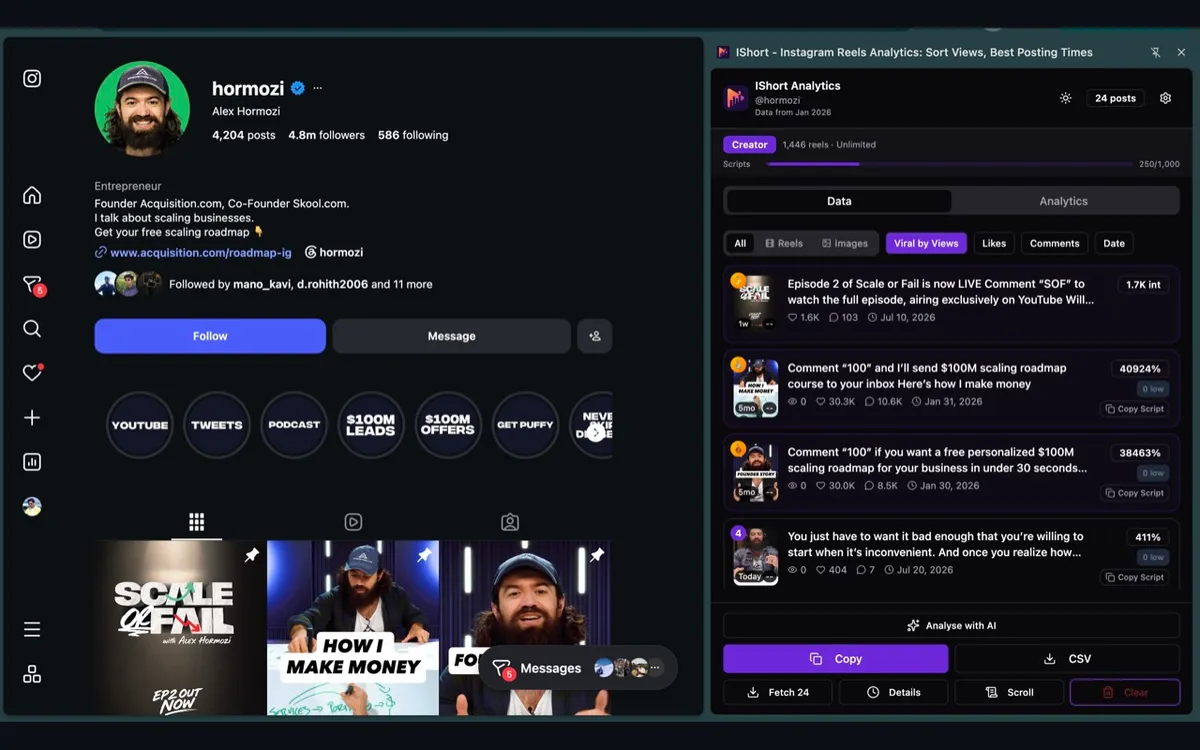
Why 20%? Because content performance follows a Pareto distribution. Later's 2025 creator economy report found that on most accounts the top 20% of Reels generate around 65 to 80% of total views (later.com/blog/instagram-statistics). Repurposing your bottom 80% is a waste of energy — you are dragging the floor with you. Repurpose the ceiling.
Step 2: Export the metadata to a CSV
Once you have your shortlist, click "Export CSV" inside IShort. You will get a spreadsheet with one row per Reel containing the URL, caption, views, likes, comments, duration, engagement percentage, post date, hashtags, music info, and video URL. This becomes your repurposing master sheet. For the full breakdown of what is included, read Export Instagram Reels Data to CSV or the deeper CSV download guide.
Add three extra columns yourself: TikTok caption, Shorts title, and Shorts description. You will fill these in during steps 4 to 6. Having all of it in one sheet means you can batch-write captions for 20 Reels in one focused hour rather than context-switching every time you re-upload.
Step 3: Transcribe the audio for repurposing
This is where IShort starts saving you serious time. Open a Reel inside the extension and click "Transcribe". That reel's audio is sent to IShort's servers, which support 11 languages, and the spoken text comes back in about 30 to 90 seconds for a typical Reel. See how Reels transcription works for the deep dive.
The transcript is your second-most valuable asset after the video itself. It becomes:
- The YouTube Shorts description (Shorts rewards keywords in the description — this is where AVD turns into discoverability).
- The first draft of an X / Twitter thread.
- The body of a LinkedIn carousel or text post.
- The skeleton of a blog post you can publish to your own site for SEO.
- Subtitles you can re-burn into the TikTok and Shorts uploads (sound-off viewing on TikTok hovers around 35% per TikTok's own data).
One Reel transcribed becomes five new pieces of content. That is the unlock.
Step 4: Adapt the hook for each platform
The single most important edit when repurposing is the hook — the first one to three seconds. Each platform wants a slightly different opening because the user state is different when the video starts.
Reels hook
Builds on context. Instagram viewers often arrive from your profile or feed, so they have some idea who you are. You can afford a more conversational opener.
TikTok hook
Brutal. The viewer is on the For You page from a cold start and will swipe in under a second if confused. Open with the most surprising frame, line, or claim. Drop the "Hi guys".
Shorts hook
Make it searchable. Open with the keyword that someone would type into YouTube. "How to repurpose Instagram Reels..." beats "So today I want to talk about..." every single time.
If your Reel opens with three seconds of intro music, cut it for TikTok and Shorts. If it opens with you saying "okay so", cut it everywhere. You can re-cut a single Reel into platform-specific versions in CapCut, Edits, or Premiere in under 10 minutes once you know exactly which 1.5 seconds to chop.
Step 5: Rewrite captions for each platform
Captions follow opposite rules per platform. Instagram captions can run long — up to 2,200 characters — and longer captions historically correlate with more saves. TikTok captions cap at 4,000 characters since 2023, but in practice the algorithm and the UI both reward short, punchy lines that fit on a single line of the overlay. YouTube Shorts captions are basically a description that doubles as SEO copy: write three to five short paragraphs with target keywords, links, and timestamps if relevant.
| Platform | Caption sweet spot | Tone |
|---|---|---|
| Instagram Reels | 125–400 characters with a hook line + value + CTA | Conversational, emoji-friendly |
| TikTok | 40–100 characters, one punchy sentence | Casual, direct, anti-influencer |
| YouTube Shorts | 300–800 characters, paragraph-style, keyword-rich | Slightly more formal, search-optimized |
Pull the Instagram caption from your IShort CSV, then write two more variants directly in the spreadsheet. Batching this 20 Reels at a time is faster than writing one fresh caption every Tuesday.
Step 6: Adapt hashtags for each platform
Hashtags are platform-specific. A hashtag trending on Instagram might not even exist on TikTok, and YouTube Shorts treats hashtags almost as keyword tags inside the description. Some rules of thumb based on Later and Hootsuite's 2025 benchmarks:
- Reels: 3 to 8 hashtags, mix of niche and broad. Instagram's official guidance has stopped pretending hashtag count is the lever — relevance is.
- TikTok: 3 to 5 hashtags. Always include at least one trending sound or topic hashtag (search the Discover tab to find them).
- YouTube Shorts: 1 to 3 hashtags inside the description plus #Shorts. YouTube treats hashtags more like categorization than like discovery boosters.
Pull the hashtag list from your CSV (IShort already extracted it). Open TikTok's Discover tab and YouTube's search suggest, search for the topic, and write down the top trending alternative tags. Replace, do not duplicate.
Step 7: Remove the Instagram watermark
This step is non-negotiable. TikTok and YouTube both visibly down-rank uploads that include an Instagram watermark or Reels overlay, and Instagram does the same with TikTok watermarks. The cleanest approach is to save the original raw video before uploading to Instagram — the version that has not yet been touched by Reels' export pipeline. That way you always have a clean master file.
If you only have the Instagram-watermarked version, three options:
- Re-crop the video so the watermark is outside the visible 9:16 frame (works on tall watermarks at the corner).
- Overlay your own logo or text element on top of the watermark.
- Use an AI watermark remover (works but the result can soften the pixels behind it).
Long-term, the simplest rule is: shoot once, post to Instagram from a clean master, save the master for TikTok and Shorts re-uploads.
Aspect ratios and dimensions are the same
Good news: there is no aspect-ratio remastering involved. All three platforms accept the same vertical format. For the deep dive on each, see Instagram Reels dimensions.
| Platform | Aspect ratio | Recommended resolution | Safe zones |
|---|---|---|---|
| Instagram Reels | 9:16 | 1080 × 1920 | Keep captions out of the bottom 250 px |
| TikTok | 9:16 | 1080 × 1920 | Keep titles out of the bottom 480 px (caption row is taller) |
| YouTube Shorts | 9:16 | 1080 × 1920 | Keep important content out of the bottom 200 px (Shorts shelf UI) |
If you film natively for Reels — vertical 1080 × 1920 — you are already shooting at the correct size for all three. The only difference is the UI overlay each platform stacks on top, which is why your text safe zones differ.
Length differences and the 60-second sweet spot
Reels and TikTok both allow much longer videos than YouTube Shorts. Reels accepts up to 20 minutes, TikTok up to 10 minutes, but the sweet spot for engagement on both is between 60 and 90 seconds. YouTube Shorts caps at 3 minutes (raised from 60 seconds in late 2024 per YouTube's official Shorts policy at support.google.com/youtube/answer/12340300), but the algorithm still prefers shorter clips for higher AVD.
The practical takeaway: if your Reel is between 30 and 60 seconds, you can post it identically across all three platforms. If your Reel is 90 seconds, it works on Reels and TikTok but you should trim it to 60 seconds for Shorts. If your Reel is 3+ minutes, it does not fit on Shorts at all; either trim it, or split it into a Shorts series.
For a deeper algorithmic comparison, our breakdown at Instagram Reels vs TikTok vs YouTube Shorts covers monetization and audience differences in detail.
Audio licensing: trending sounds don't transfer
One of the most common (and silent) reasons cross-posted Reels flop on TikTok is that the trending sound used in the Reel is not licensed on TikTok. The video uploads fine, but TikTok strips or mutes the music server-side, leaving you with a Reel that has lost its emotional spine.
Two safe approaches:
- Use original audio. If you recorded the audio yourself (talking, ambient sound, a song you own), it transfers cleanly across all platforms. Most "talking head" educational creators are best served by this approach. See Original Audio vs Trending Sounds for the trade-off.
- Use a cross-licensed library. Royalty-free libraries like Epidemic Sound, Artlist, or Soundstripe explicitly clear their tracks for use across Instagram, TikTok, and YouTube. You will not hit the same algorithmic boost as a trending Reels sound, but the upload is safe.
For platform-trending sounds, the honest answer is: find a TikTok-trending sound for the TikTok version, and a Shorts-friendly licensed track for the Shorts version, and accept that the audio differs. The video stays the same; the audio is platform-specific.
Five ways to make repurposed content not feel recycled
Your audience can sniff out lazy repurposing. The trick is to repackage, not just re-upload. Five techniques that keep repurposed content feeling fresh:
Re-hook
Film a fresh 2-second opening line for each platform that addresses that audience directly. "If you're on TikTok and you ever wondered..." reads completely differently to a TikTok native than the Reels version.
Re-cut
Shorten by 10-20% for TikTok (it wants tighter completion) and re-edit the order. Same content, different rhythm. CapCut handles this in minutes.
Recontextualize
On Shorts, frame the same content as a tutorial or a chapter ("Part 1 of 5"). The framing flags it as educational, which Shorts loves.
React to your own video
Use TikTok's Stitch or Duet on your own original to add a fresh angle. Now it is a new piece of content that references the old one.
Add new B-roll
Cut in two or three shots that weren't in the Reel. Even three seconds of fresh footage is enough to make the algorithm and the viewer treat it as new.
Beyond video: turning Reels into blogs, X threads, and LinkedIn carousels
This is where the IShort transcript becomes a quiet superpower. A 60-second Reel transcript is roughly 150 to 180 words. That is enough material for:
- An X thread. Split the transcript into 5 to 8 tweets, add a hook on tweet 1, and post.
- A LinkedIn carousel. Split the transcript into 6 to 10 slides, design each in Canva or Figma, and upload as a PDF document post.
- A short blog post. Expand each sentence of the transcript into a paragraph, add a few hyperlinks and one image, and you have a 700-word SEO-friendly post.
- A newsletter blurb. Paste the transcript into your newsletter with the video embedded below.
- A pinned comment script. Use the punchline from the transcript as a pinned comment on the Reel itself to drive engagement.
One Reel turns into one video on three platforms plus four text formats. Seven pieces of content from one shoot. That is the ratio that separates creators who grow from creators who burn out.
Manual vs IShort vs auto-repurpose tools
There are a few categories of tooling in this space. Here is the honest comparison:
| Approach | What it does well | Where it falls short |
|---|---|---|
| Manual (no tools) | Free. Full creative control. | Hours of copy-paste. No way to sort top performers. |
| IShort + manual upload | You see which Reels are worth repurposing. You get captions, hashtags, and transcripts pre-extracted. You stay in control of the cuts. | You still do the platform uploads yourself. |
| Auto-repurpose tools (e.g. Repurpose.io, OpusClip) | One click pushes the same Reel to Shorts, TikTok, and beyond. | Usually crops or re-encodes the video, often preserves the watermark, and does not adapt captions or hashtags. Saves time, loses performance. |
The IShort approach is built around the idea that the bottleneck is not uploading, it is knowing which video to upload and how to package it. The upload itself takes 90 seconds per platform; deciding what to repurpose and rewriting the caption is where the leverage is.
When to shoot a hero video first, then repurpose
Repurposing stretches one idea across formats - but some moments, like a product launch or a big announcement, deserve a purpose-built hero video first. If that is you (especially founders launching a product), studios like Flowjam produce short launch videos you can then repurpose into Reels, Shorts, and clips. Cut the hero once, then run it through the same top-performer workflow above to spin off the platform-native versions.
Frequently Asked Questions
Is it bad to repurpose Instagram Reels to TikTok and YouTube Shorts?
No. Cross-posting is encouraged by all three platforms as long as you avoid visible competitor watermarks. TikTok and YouTube both penalize obvious Instagram watermarks, and Instagram down-ranks TikTok watermarks. Strip the watermark and you can safely repurpose the same video.
Which Reels should I repurpose first?
Only your top 20%. Use IShort to sort your Reels by views and Viral Score, pick the proven winners, and skip the misses. Repurposing a flop on three platforms just multiplies the flop.
Do I need to change anything when posting a Reel to TikTok?
Yes. Strip the Instagram watermark, tighten the hook to the first one to two seconds, swap trending audio for an alternative (the original sound may not be available on TikTok), shorten the caption, and use TikTok-trending hashtags rather than Instagram ones.
What length works best across Reels, TikTok, and Shorts?
Around 60 seconds is the safe overlap. Reels and TikTok both reward 60 to 90 second videos with strong watch time, while YouTube Shorts caps at 3 minutes but the algorithm still prefers under 60 seconds for higher AVD (average view duration).
Can I turn one Reel into multiple kinds of content?
Yes. With IShort you can transcribe the audio and then reuse the transcript as a YouTube Shorts description, an X thread, a LinkedIn carousel, or a blog post. One Reel can become a video on three platforms plus three to four text formats.
Repurpose smarter, not harder
IShort identifies your top-performing Reels, exports the metadata to CSV, and transcribes the audio — the exact three steps every cross-platform creator needs before posting to TikTok and Shorts. Free to install, with analytics data stored locally in your browser.
Install IShort for Chrome →