

TL;DR: In 2026, the Instagram Reels algorithm treats sends per DM as the single most heavily weighted distribution signal, ranking above likes, comments, and saves. To grow Reels you have to stop designing content people want to like and start designing content people want to send. This guide breaks down the 8 content types that drive shares, the captions and hooks that prompt sends without engagement bait, the send-rate benchmarks by niche, and the A/B tests that actually move the needle.
What Mosseri Actually Said About Sends
For years, creators have argued over which engagement metric the Reels algorithm cares about most. In 2025 Adam Mosseri, the head of Instagram, put the debate to rest in a series of public posts on the @creators account and on Threads. He stated, in plain language, that sends per reach is the strongest signal of value in the Reels ranking model, and that he personally watches the metric because sends predict whether a Reel keeps growing or stalls out.
This was not the first time Instagram acknowledged the importance of shares. Mosseri's 2023 ranking explainer already named sends as a key Reels signal, and third-party analyses by Buffer's 2026 algorithm guide, Sprout Social's algorithm explainer, and Later's algorithm analysis have all converged on the same conclusion: the gap between sends and the next most important signal has widened in 2026. Mosseri simply confirmed publicly what creators had been measuring privately.
Why Sends Beat Likes, Comments, and Saves in 2026
The reason sends sit on top of the ranking stack is structural, not arbitrary. Instagram is a recommendation engine, and recommendation engines are starved for high-quality signals. Likes are noisy because they cost almost nothing. Comments are useful but biased toward controversy. Saves are valuable but private. Sends, by contrast, are the rarest action a viewer can take, and each one carries information the algorithm cannot get anywhere else.
Three things make a send especially valuable to Instagram:
- Social cost. Sending a Reel to a friend means putting your taste on display. People only do this when they believe the content is genuinely worth it.
- Guaranteed new view. A send produces a fresh impression from a high-affinity audience, the recipient, which feeds the next ranking cycle. No other engagement action creates a confirmed new viewer.
- Cluster signal. Sends happen inside friend graphs, which lets Instagram identify the small communities where a Reel resonates and then expand distribution into similar clusters.
The result is that two Reels with identical view counts and identical likes can have wildly different fates. The Reel with a 1.8% send rate keeps getting distributed for days. The Reel with a 0.2% send rate plateaus inside the first 24 hours, no matter how many likes it has. For a deeper breakdown of how sends interact with the other ranking inputs, see our full Instagram Reels algorithm 2026 guide.
The "You Have to See This" Effect
Every send starts with the same internal monologue: a viewer thinks of a specific person and says, "they have to see this." That phrase is the entire game. If your Reel never triggers that thought, sends will not happen no matter how clever the hook or how trendy the audio.
Reels that trigger the "you have to see this" reflex tend to do one of four things: they make the viewer feel seen, they make the viewer feel smarter, they make the viewer feel something strong enough to need a witness, or they give the viewer something useful enough to mark as a favor. Everything else is content that gets liked and forgotten. The job is not to make a great video. The job is to make a video that is incomplete until it has been forwarded.
How Sends Are Measured
Instagram tracks sends in two distinct ways, and creators often confuse them.
- Sends that happen. The raw count of times your Reel was sent into a DM thread. This appears in your Insights as "Shares" once you tap the breakdown for DM sends.
- Views from a send. Impressions generated when a recipient watches a Reel that was sent to them. These count toward your overall reach and are some of the highest-quality views you can get.
The ratio you care about is sends divided by reach, often called sends per reach or simply send rate. This is the unit you should be optimizing for, not raw send counts. A small account with a 3% send rate is behaving more virally than a large account with a 0.4% send rate, and the algorithm treats it accordingly. One important honesty note: send counts are private — only you can see them, in your own Insights. No third-party tool, IShort included, can read send counts for other accounts, because Instagram never exposes them publicly.
8 Content Types That Drive High Sends per Reach
Certain content shapes consistently earn shares, and you can spot them in the wild through their public footprint: outlier view counts and unusually active comment sections. None of them require a big follower count to work.
1. Reactable Opinions
A clear, defensible take on a topic people already argue about. Viewers send it to friends who agree or to friends who will hate it. Both directions count.
2. Practical "You Need This"
A small, specific tip that solves a problem in under 30 seconds. The send becomes a favor: I just made your life slightly easier.
3. Surprising Data or Facts
A single statistic that breaks an assumption. Works best when the number is counterintuitive but verifiable.
4. Relatable Shared Experiences
The "this is so me and Sarah" Reel. The viewer cannot watch without picturing one specific person. That picture is the send.
5. Inside Jokes for a Niche
Humor that only lands if you already belong to the community. Narrow niches outperform broad humor on sends because the joke doubles as a tribal identifier.
6. Cute or Wholesome Moments
Pets, kids, small kindnesses. Send rate is high because the cost of sending is low, no one judges you for forwarding a wholesome clip.
7. "Tag a friend who..." Callouts
Used to be the most effective format. Still works, but the audience has caught on. Use sparingly and only when the friend identification is genuinely specific.
8. News and Commentary
Quick takes on shared events while they are still hot. The send is the way viewers process the news with the people they care about.
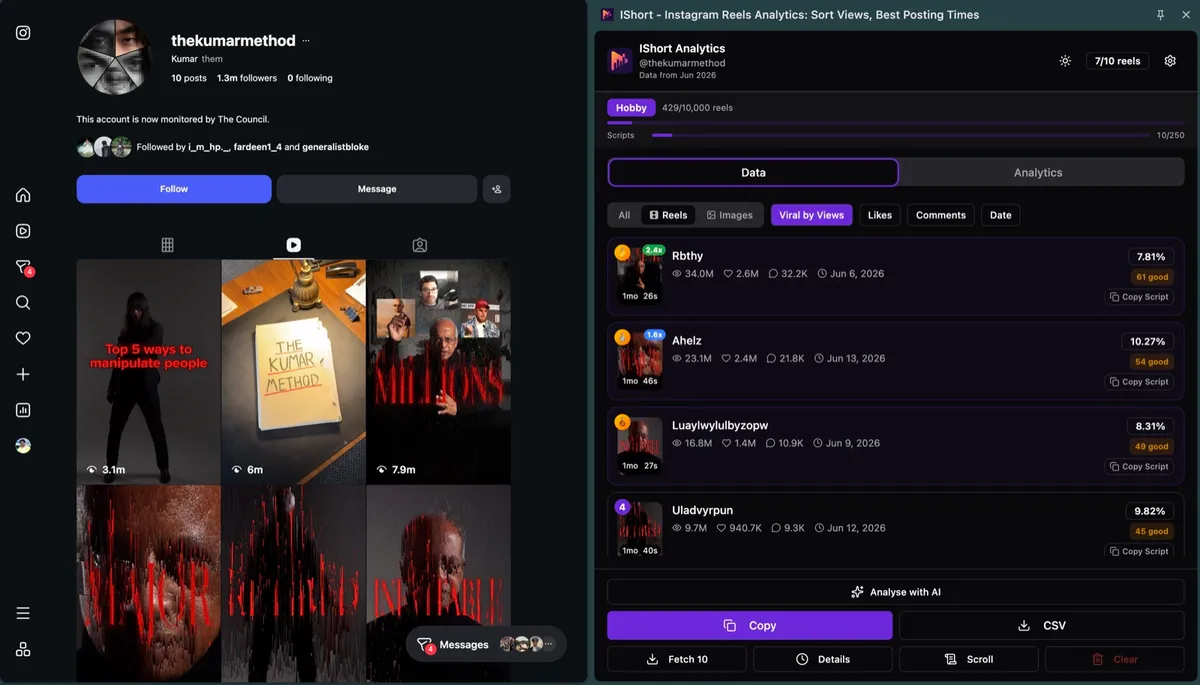
If you want to see which of these formats outperform in your specific niche, you can install IShort and sort any competitor's profile by views or engagement to surface the outliers — the Reels that massively beat the account's baseline are almost always the ones being shared heavily. Most creators do not realize a competitor has a breakout format until they sort the whole catalog instead of scrolling it. Our find top performing Reels guide walks through this workflow in detail.
Hooks That Trigger the Send Instinct
The first second of a Reel does not just decide whether someone keeps watching. It also decides whether they are mentally cataloguing the Reel as something to forward. Hooks that trigger send instinct have a specific quality: they make the viewer think of another person before the value is fully delivered.
Examples of hooks that prime the send reflex:
- "If you have a friend who is always late, send them this."
- "Whoever needs to hear this today, here we go."
- "This is for the one person who is going to laugh at this."
- "You are in this video. Yes, you."
- "I cannot believe nobody is talking about this."
Notice none of these are pure curiosity hooks. They are social hooks, designed to summon a specific friend into the viewer's mind. A good social hook can lift send rate by 30-50% without changing the body of the Reel at all. The watch-time penalty is real if the hook does not deliver, though, so make sure the payoff matches the setup. For a deeper dive into watch time, see our Instagram Reels watch time guide.
Captions That Prompt Sends Without Being Cringe
The caption is your last chance to convert a viewer into a sender. The mistake most creators make is asking for the send too directly. "Tag a friend who agrees" reads as engagement bait in 2026 and is actively suppressed by the algorithm.
Captions that work better:
- "Send this to the person you immediately thought of."
- "If this made you think of someone, they probably need to see it."
- "Show this to the friend who keeps doing this."
- "Save it for later or send it to whoever is going to relate."
The pattern is to invite the send without commanding it, and to ground the call to action in a specific feeling the viewer already had while watching. The data shows that captions structured this way lift send rate by 20-40% on content that was already shareable, but they cannot rescue content that nobody wanted to share in the first place.
Audio Choice and Sends
Audio is a multiplier on sends, not a substitute for shareable content. Trending sounds increase send rate because the recipient is more likely to recognize the audio, which makes the send feel less random. Original audio increases send rate when the audio itself is the joke or the hook, since the recipient cannot fully experience the content unless they open it.
The practical rule is to match audio to content type. Reactable opinions and commentary do well with original audio. Relatable experiences and inside jokes do well with trending audio that signals "I am part of this moment." When in doubt, browse the audio panel and pick a sound that is trending but not yet saturated.
How to Measure Your Send Rate
Instagram Insights gives you the raw send count buried in the "Shares" breakdown on each Reel, but it does not display sends per reach as a sortable column — and because sends are private, no external tool can compute it for you. Here is the honest workflow.
- Your own account: manual math. Open each Reel's Insights, pull the share count and the reach figure, and divide. Track the ratio in a spreadsheet for your last 20-30 Reels to establish your personal baseline.
- Any account (yours or competitors'): public proxies. The IShort extension surfaces public data — views, likes, comments, engagement rate and outlier scores for every Reel of any public profile, sortable by views, Viral Score, likes, comments or date. Reels with outlier views and comment counts far above the account's baseline are, in practice, the heavily-shared ones.
If you are unsure why a Reel underperformed, sends per reach is usually the first place to look. Our companion guide on why Reels get no views covers the diagnostic flow in full, but in most cases low sends is the upstream cause of low views, not the other way around.
Sends per Reach Benchmarks by Niche
Because send counts are private, there is no verified public dataset of send rates — be skeptical of anyone claiming otherwise. The ranges below reflect what creators commonly report when sharing their own Instagram Insights publicly. Treat them as directional ballparks, not exact benchmarks.
| Niche | Median Send Rate | Top 10% Send Rate |
|---|---|---|
| Personal finance | 1.4% | 3.6% |
| Relatable humor | 1.2% | 4.1% |
| Education and how-to | 1.0% | 2.8% |
| Fitness and health | 0.8% | 2.1% |
| Food and recipes | 0.7% | 1.9% |
| Beauty and fashion | 0.5% | 1.4% |
| Lifestyle and aesthetics | 0.4% | 1.1% |
| News and commentary | 0.6% | 1.7% |
If your send rate is consistently below the median for your niche, the problem is upstream of distribution. The content is not built to be sent. To get a numerical picture of how your top Reels are performing against your own catalog, our outlier score methodology highlights which Reels broke the pattern.
Common Mistakes That Kill Send Rate
Five mistakes show up over and over in low-send Reels:
- Too long. Reels above 45 seconds rarely get sent because the recipient knows they will have to commit. Tighten ruthlessly.
- Slow hook. If the viewer has not formed an opinion or thought of a friend in the first 2 seconds, the send is gone.
- Niche too narrow, or too broad. Universal content is bland. Hyperspecific content alienates. The sweet spot is content that resonates inside a community of a few thousand to a few hundred thousand people.
- Ambiguous CTA. "Engage in the comments" is not a send prompt. If you want shares, name the action.
- Generic visuals. Stock-feeling b-roll signals to the recipient that they are about to be sent something forgettable. Treat the first frame like a thumbnail.
5 A/B Tests to Boost Sends Specifically
You do not need a posting schedule overhaul. You need targeted experiments that isolate send rate. Five tests that produce useful data within two weeks:
- Hook test. Same body, two hooks: one curiosity, one social. Compare send rate.
- Caption test. Same Reel, two captions: one with a send prompt, one without.
- Length test. Same idea cut to 15 seconds and 30 seconds. Sends per reach almost always favors the shorter cut.
- Audio test. Same script, trending sound vs. original audio.
- Visual identity test. Same content, one version with on-screen text, one without.
For a structured framework that takes the guesswork out of these experiments, see our Instagram Reels A/B test guide.
Sends Inside the Ranking Cluster
Sends do not operate in isolation. They are the strongest signal in a cluster that also includes watch time, likes per reach, and completion rate. A Reel with a high send rate but a terrible completion rate still gets penalized, because the algorithm reads the discrepancy as "people sent this to be funny, not because it was actually good." Conversely, a Reel with high completion and high sends compounds: each signal reinforces the other, and distribution accelerates.
The practical implication is that you should not chase sends at the expense of watch time. Build the watch time first. Then layer the send mechanics on top. For a full breakdown of how the signals interact, see our Instagram Reels algorithm 2026 guide and the broader how to go viral on Reels playbook.
FAQ
What is sends per DM on Instagram Reels?
Sends per DM is the count of times your Reel was shared into a direct message conversation, divided by the number of unique accounts the Reel reached. In 2026 it is the single most heavily weighted distribution signal in the Reels ranking model, ranking above likes, comments, and saves.
Why are sends per DM weighted higher than likes?
A like takes one tap and reveals nothing about who else might enjoy the content. A send takes effort and puts the sender's taste on the line. Because sends are costly and social, Instagram treats them as a much stronger quality signal, and each send also creates a guaranteed new high-affinity view.
What is a good sends per reach rate?
A healthy send rate sits between 0.5% and 1.5% of reach. Anything above 2% is exceptional. Niches like personal finance, education, and relatable humor regularly hit 3% or higher, while news commentary and lifestyle aesthetics tend to sit below 1%.
How do I see sends on a competitor Reel?
You can't — send counts are private and visible only to the account owner in Instagram Insights. No third-party tool can show them. What you can do is use public proxies: the free IShort Chrome extension surfaces views, comments, engagement rate, and outlier scores for every Reel on any public profile, and the Reels that massively beat an account's baseline are usually the heavily-shared ones.
Will telling viewers to send the Reel actually work?
A soft prompt like "send this to someone who needs it" can lift sends by 20-40% on content that is already shareable. Heavy-handed engagement bait such as "send to win" or "tag a friend if you agree" is penalized by the algorithm and should be avoided.
Spot the Reels that are getting shared
Send counts are private, but the Reels they boost are not. IShort sorts any public profile by views, comments, and engagement, and flags the outliers that broke out — so you can reverse engineer shareable formats instead of guessing.
Install IShort Free →