

Short answer: an Instagram audit is a check of what an account posts and how each post performed, so you can keep what works and drop what does not. To run one for free, install IShort, open the account's Reels tab on instagram.com, let IShort collect the Reels, then walk through its analytics slides: Overview, Scatter, Heatmap, Hashtags, Performers, Duration and Tips. It works on your own account and on any competitor you can view. It is a content audit. It does not check fake followers or audience demographics.
What people mean by "Instagram audit"
"Instagram audit" is searched about 1,000 times a month worldwide, with "instagram audit tools" at 390, "instagram audit checklist" at 260 and "free instagram audit" plus "instagram audit free" at about 250 combined (Ubersuggest, 25 September 2026). Those searches hide three different jobs:
| Audit type | Question it answers | Does IShort do it? |
|---|---|---|
| Content audit | Which posts, formats, lengths, times and hashtags actually earn views and engagement? | Yes. This is what IShort is built for, on any account you can view |
| Audience or follower audit | Are the followers real? Where do they live? How old are they? | No. Tools such as HypeAuditor or Upfluence focus on this. IShort does not estimate fake followers or demographics |
| Profile set-up audit | Is the bio clear, is there a link, are highlights organised? | Partly. Use the checklist below by eye. IShort adds a free link-in-bio page with click analytics if the link is the gap |
If you are a creator trying to grow, or a manager deciding what to post next, the content audit is the one that changes results. If you are a brand checking whether a creator's followers are real, you need an audience audit tool as well.
How to run the audit with IShort (10 minutes)
- Install IShort for Chrome or Edge and sign in with Google in the side panel. No Instagram password is asked for.
- Open the account on instagram.com in your desktop browser and click the Reels tab.
- Collect the Reels. Scroll or use the collect button. For a useful audit, collect at least the last 30 to 60 Reels; for a full audit, collect everything.
- Open the analytics slides and go through them in order. Each one answers one audit question (see the next section).
- Sort the list by Views and then by Viral Score to see the best and the most over-performing posts.
- Export to CSV or copy to Google Sheets so you can keep the audit, compare it next month, or share it with a client.
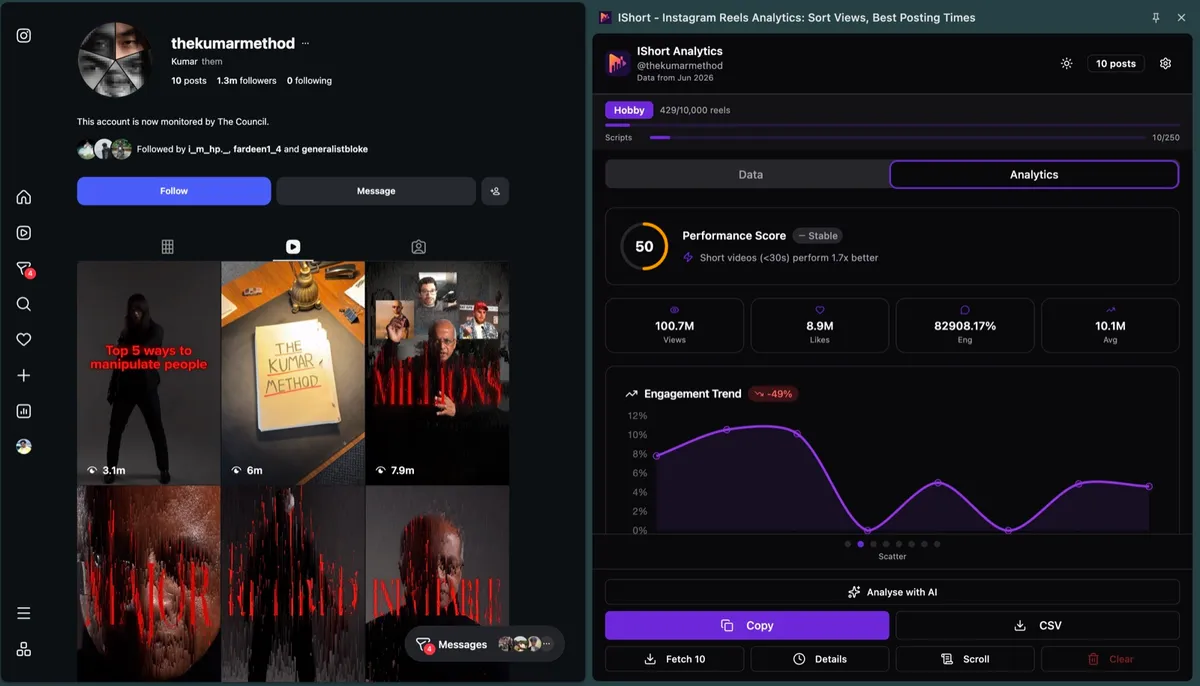
The seven checks, and where IShort shows each one
1. Baseline: what is "normal" for this account?
The Overview slide gives total and average views, likes and comments and the average engagement rate. Write these down. Every other judgement is relative to this baseline. A Reel with 50,000 views is a hit on an account that averages 8,000 and a miss on one that averages 200,000.
2. Outliers: which posts broke out?
Sort by Views, then by Viral Score. Look at the "x avg" badge on each card; it shows how many times the account's average views a Reel earned. List every Reel at 2x or above. These are the ideas the audience asked for. Our outlier score guide explains why this beats raw view counts.
3. Flops: what should stop?
The Performers slide shows the best and worst Reels side by side. If the bottom five share a format, topic or length, that is the clearest "stop doing this" signal you will get.
4. Reach vs reaction
The Scatter slide plots views against engagement. Reels high on views but low on engagement were shown to people who did not care. Reels low on views but high on engagement are good ideas that deserve a remake with a stronger hook.
5. Timing
The Heatmap slide shows average views by day of week and 3-hour window. See the best time to post checker for how to read it without being fooled by one lucky post.
6. Length and audio
The Duration slide compares short Reels (under 30 seconds) with longer ones and original audio with licensed music. Many accounts find one side wins by 1.5x or more.
7. Hashtags
The Hashtags slide lists tags used on at least two posts with their average views and engagement. It tells you which tags go with winners, not which tags cause them; see hashtag analytics for how to use that.
Audit any Instagram account for free
Seven checks from the account's own Reels. No business account, no API, no Instagram login.
Install IShort FreeInstagram audit checklist (copy this)
| Check | What to write down | Healthy sign | Warning sign |
|---|---|---|---|
| Baseline | Average views and engagement rate | Stable or rising over recent months | Falling for three months or more |
| Consistency | Reels posted per week | A steady rhythm | Long gaps followed by bursts |
| Outliers | Reels at 2x average or above | At least one in every ten posts | None in the last 30 posts |
| Winning formats | Formats and topics shared by outliers | A clear repeatable pattern | Every hit is different (luck) |
| Flops | Formats shared by the bottom five | Flops are one-off experiments | A format keeps losing but keeps being posted |
| Timing | Best two or three day-hour windows | Most posts go out in winning windows | Posting mostly in weak windows |
| Length and audio | Short vs long, original vs licensed | Posts match what wins | Posting the losing length by habit |
| Hashtags | Tags on the best Reels | Few, specific, on-topic tags | Long generic lists |
| Hooks | First line of the top five Reels (use Transcribe) | Clear promise in the first seconds | Slow intros |
| Profile | Bio, link, pinned posts | Bio says who it is for; link tracked | No link, or a link with no analytics |
For the hooks row, click Transcribe on the top Reels. IShort turns the audio into a timestamped script in English, Hindi and other Indian languages, so you can compare how the winners open. Free includes 10 transcripts; paid plans include 250 or 1,000 a month.
Auditing competitors, not only yourself
An audit of your own account shows what your audience likes. An audit of three competitors shows what your market likes, and that is often the bigger opportunity. Run the same seven checks on two or three accounts in your niche that are slightly bigger than you. Then compare:
- Formats that are outliers for them and that you have never tried.
- Posting windows that win for all of them.
- Lengths and audio choices that win across the niche, not only on one account.
Export each audit to CSV and put them in one spreadsheet. A column per account makes gaps obvious. The competitor analysis guide goes deeper on this.
Free Instagram audit tools compared
Most "free Instagram audit" results are web tools where you type a username. They are quick, but most read only the latest posts. Here is how the main approaches differ.
| Tool type | Posts read | Any account? | Fake follower check | Export |
|---|---|---|---|---|
| Web audit tools (type a username) | Usually the most recent posts | Yes | Often, on paid plans | Varies; often a paid PDF |
| Instagram Insights | All your posts | No, own account only | No | No |
| Audience audit tools (for brands) | Recent posts plus follower sample | Yes | Yes, main focus | Paid reports |
| IShort extension | Every Reel you collect, up to the whole account | Yes, any account you can view | No | CSV and Google Sheets |
Where IShort is weaker: it runs in a desktop browser, not in a web form you can use from your phone, and it does not say anything about follower quality. Where it is stronger: it can read the whole Reels library rather than a recent sample, and every number comes from posts you can open and check.
Turning the audit into next month's plan
Keep three winners
Pick the three formats that most often reach 2x average. Make them at least half of next month's Reels.
Drop one loser
Stop the format that shows up most in the bottom five. Replace it with a test.
Move the schedule
Shift posts into the two best windows from the heatmap and re-check in four weeks.
Rewrite hooks
Use Copy for AI rewrite on a winning transcript, paste into ChatGPT or Claude, and write hooks for your own topics in the same shape.
If you prefer a written summary, Analyse with AI builds a prompt from the account's top posts and opens it in ChatGPT or Claude. It is a fast way to get a first draft of an audit report that you then check against the numbers.
Honest limits
- Content audit only: no fake follower detection, no demographics, no reach or watch-time data (those stay in the owner's Insights).
- Desktop Chrome or Edge; not the Instagram app.
- IShort reads only what Instagram shows you in your own browser session and never gets around private settings.
- Free covers your first 500 Reels analysed and 10 transcripts. Hobby is $10 a month (10,000 Reels, 250 transcripts); Creator is $29 a month (unlimited Reels, 1,000 transcripts). Every feature is on every plan.
Find out what is working, and what is not
Install IShort free and run the seven-check audit on your account and your top competitors today.
Install IShort Free Add to Edge - Free