

Short answer: Reelyzer is a clean, simple Reels analyzer: type a username (with its Chrome extension installed), and it sorts that profile's latest 25 Reels for free, with a heatmap, CSV/Excel export and MP4 downloads. IShort does the same core job inside the Instagram tab and adds outlier badges, a Viral Score, AI transcripts in English and Indian languages, more analytics slides and bulk downloads, with every feature on the free plan. Reelyzer is simpler; IShort goes deeper. Facts below were read on 25 September 2026.
What Reelyzer offers (checked 25 September 2026)
From reelyzer.com and its pricing page:
- Sort any public profile's Reels by views, likes, comments and engagement rate.
- Posting-time heatmap, duration analysis and rankings.
- CSV and Excel export, and download any Reel as MP4.
- Free: up to 25 Reels per analysis, 3 analyses per day, no sign-up required. The homepage asks you to install its Chrome extension to analyze.
- Pro: $9 a month billed yearly (the homepage table shows "$14/mo or $108/yr"), unlimited Reels and analyses, saved analyses.
Search interest in the brand is small but growing: Ubersuggest shows about 50 searches a month on average, with 260 in August 2026 (25 September 2026).
IShort vs Reelyzer side by side
| IShort | Reelyzer | |
|---|---|---|
| Free Reels per profile | Whole library, within your first 500 Reels analysed | Latest 25 per analysis, 3 analyses a day |
| Sign-up for free use | Google sign-in in the side panel | None for the free analyzer (extension install needed) |
| Sort options | Views, Viral Score, Likes, Comments, Date | Views, likes, comments, engagement rate |
| Sort by engagement rate | No (shown on every Reel and in CSV) | Yes |
| Outlier badge vs account average | Yes ("x avg" on every Reel) | Not advertised |
| Viral Score | Yes, 0-100 | No |
| AI transcripts | Yes; 10 free, 250 or 1,000 a month on paid plans | Not advertised |
| Heatmap | Yes | Yes |
| Other analytics | Scatter, hashtags, best/worst performers, duration and original vs licensed audio, content types, saves/shares, tips | Summary stats, duration, posting patterns |
| Downloads | Reels, photos, full carousels and bulk whole account; unlimited on every plan | Reels as MP4 |
| Export | CSV and copy to Google Sheets | CSV and Excel |
| "Analyse with AI" prompt | Yes (ChatGPT or Claude) | No |
| Paid price | Hobby $10/mo; Creator $29/mo (monthly) | Pro $9/mo billed yearly; $14/mo monthly |
Go past the first 25 Reels for free
IShort ranks an account's whole Reels library, flags outliers and transcribes the winners. Every feature on every plan.
Install IShort FreeWhat Reelyzer does better
- Simpler first run. Type a username in a box and get results, no account needed. IShort asks for a Google sign-in before it counts your free Reels.
- Sort by engagement rate. Reelyzer ranks by engagement rate directly. IShort shows engagement rate on every Reel and in the export but does not sort by it.
- Excel export. Reelyzer exports .xlsx as well as CSV. IShort gives CSV and clipboard copy for Sheets.
- Cheaper yearly. If you want unlimited Reels, Reelyzer Pro at $9/mo billed yearly ($108) is cheaper than IShort Creator at $29/mo. IShort Hobby ($10/mo, 10,000 Reels) is the fairer comparison for most creators.
What IShort does better
- The whole library, free. Twenty-five Reels is about a month of posting for an active account. Most breakout Reels are older than that. IShort collects everything you scroll, within the free 500-Reel allowance.
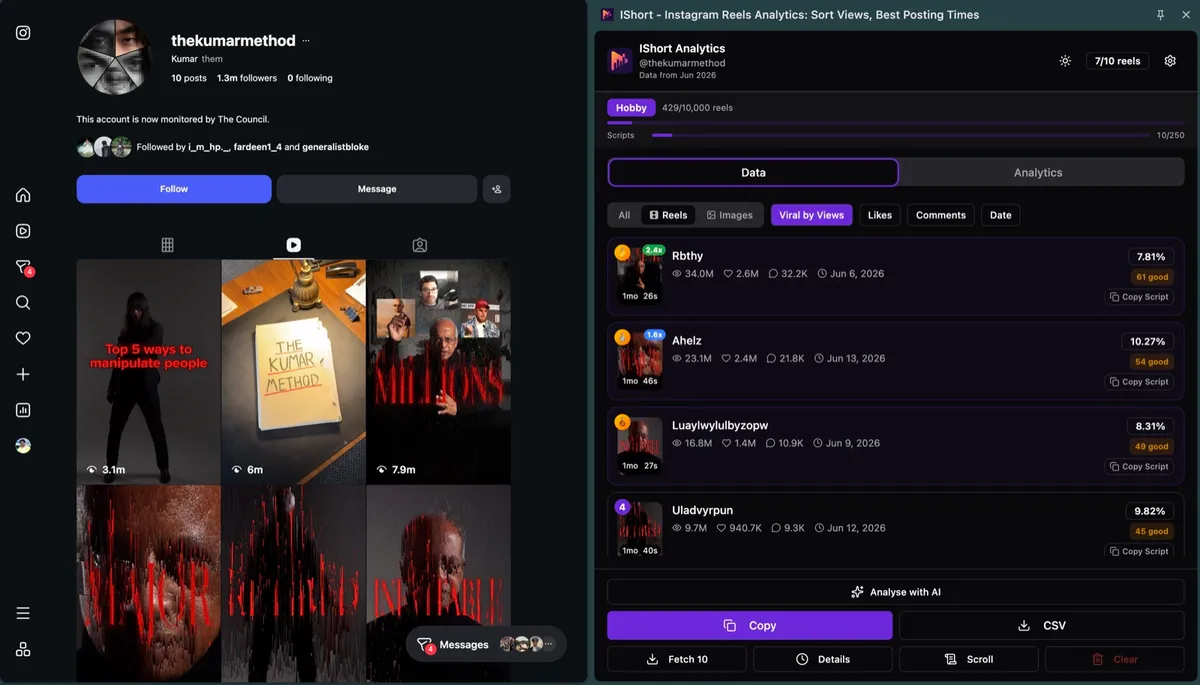
- Outliers and Viral Score. Raw views reward big accounts. The "x avg" badge and Viral Score show which Reels beat their own normal, which is what you want to learn from. See the viral Reels finder.
- Transcripts. Click Transcribe on a winning Reel and read its script, including Hindi and other Indian languages. See Instagram Reel transcript.
- More analysis. Scatter of views vs engagement, hashtag performance, best and worst performers, original audio vs licensed music, and saves/shares where Instagram shows them.
- Bulk downloads. Download an entire account's media in your chosen sort order, with rank and views in each filename.
Switching from Reelyzer to IShort
- Install IShort for Chrome or Edge and sign in with Google in the side panel.
- Open the profile you used to analyze in Reelyzer, on instagram.com, and click the Reels tab.
- Collect the Reels by scrolling or with the collect button. Go past the first 25.
- Sort by Views, then by Viral Score, and compare what changes.
- Open the slides (Heatmap, Duration, Hashtags, Performers) for the analysis Reelyzer showed, and more.
- Export to CSV and open it in Excel if you prefer spreadsheets.
Why the first 25 Reels are rarely enough
Reelyzer's free limit is the latest 25 Reels. That is a fair trial, but it shapes what you see. Consider an account that posts five Reels a week. Its latest 25 cover roughly five weeks. Now think about how breakouts happen: a creator finds a format, it pops once, they repeat it for a while, then move on. If the big hit was eight months ago, a 25-Reel window never shows it, and you conclude the account "averages 20,000 views" without ever seeing the 900,000-view Reel that built it.
There is a second effect. Recent Reels are still collecting views, so a window of only recent posts makes everything look smaller and flatter than it will end up. The "x avg" comparison also gets weaker, because the average is built from a small, young sample.
So when you are researching an account seriously, collect as far back as makes sense (a year is a good default for active accounts), then sort. That is the case where IShort's free allowance matters: 500 Reels analysed is enough to go deep on several competitors before you ever think about paying.
A first session checklist (for either tool)
- Pick three accounts in your niche: one leader and two close to your size.
- For each, write down the average views and the three most viewed Reels.
- Note which of those three are more than 2x the average. Those are the real breakouts.
- Check the heatmap for each account and note any day-hour window that wins on at least two of them.
- With IShort, transcribe the three breakouts per account and copy their first lines into one note.
- Decide on two formats to test in your next five Reels.
If you can finish this list in Reelyzer's free tier, you may not need anything else. If you run out of Reels, need scripts, or want the Viral Score view, that is where IShort earns its place.
Which one should you use?
| If you... | Pick |
|---|---|
| Want a quick look at the latest 25 Reels with no account | Reelyzer free |
| Need to sort by engagement rate inside the tool | Reelyzer |
| Want an account's all-time breakout Reels, not only the latest month | IShort |
| Want the scripts behind the winners | IShort |
| Research Hindi or other Indian-language creators | IShort |
| Want unlimited Reels at the lowest yearly price | Reelyzer Pro (yearly) |
Honest limits of IShort
- Desktop Chrome or Edge only.
- No sort by engagement rate or duration; sorts go one direction.
- Public numbers only; no reach or demographics.
- Instagram only.
- IShort reads only what Instagram shows you in your own session and never gets around privacy settings.
How we checked: Reelyzer facts were read from reelyzer.com and reelyzer.com/upgrade in a browser on 25 September 2026. IShort facts are from the live Chrome Web Store build (v2.4.1) and ishort.pro. Prices change; check each site before you buy.
Try IShort next to Reelyzer
Open the same profile in both and compare. IShort is free to start, no Instagram login.
Install IShort Free Add to Edge - Free